AI Gadgets · Guide · Updated
AirPods Live Translation in 2026: Which AirPods Work, the 9 Languages, and How to Use It
By KGen Research · Published · 13 min read · Some links are affiliate links; we may earn a commission at no extra cost to you. Disclosure
Short answer
AirPods Live Translation is a free iPhone feature that plays a spoken translation of the person in front of you in your AirPods. You need AirPods 5, AirPods Pro 2 or 3, AirPods 4 with ANC or AirPods Max 2, plus an iPhone 15 Pro or later on iOS 26 or later. It covers 9 languages and often waits until the speaker finishes a sentence.
As an Amazon Associate, KGen earns from qualifying purchases. Amazon links on this page are paid links. Prices we quote are Apple’s own list prices; Amazon’s price can differ and changes often.
How we researched this
This is a research guide, not a hands-on test: we haven’t used Live Translation ourselves. Requirements, languages, setup steps and list prices come from Apple’s support pages, user guide, newsroom and online store, checked on October 3, 2026. What it’s like in a real conversation comes from named reviewers at Macworld and Cult of Mac and from travelers’ reports on Reddit, credited where we use them. We earn a commission on Amazon purchases made through this page; Apple didn’t pay to be covered. See how we research.
What is AirPods Live Translation?
AirPods Live Translation is an Apple Intelligence feature that listens to someone speaking another language and plays the translation in your ears, while your iPhone shows a running transcript.1 Apple switched it on with iOS 26 on September 15, 2025 in five languages and had grown the list to nine by that November.2, 3
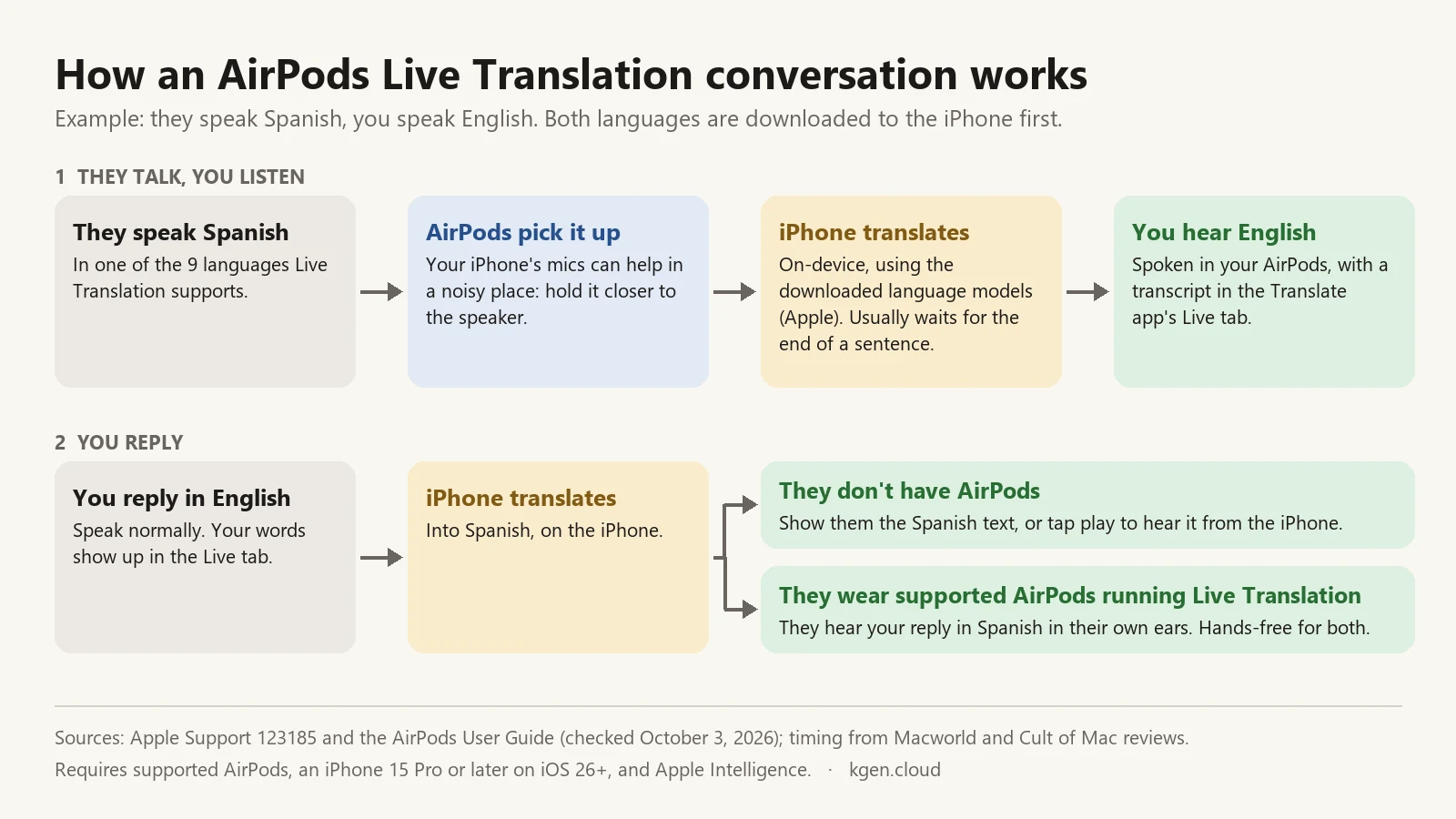
The AirPods are the microphone and the speaker. The translating happens on your iPhone. Apple says that once you’ve downloaded the other person’s language and your own, “all processing takes place on your iPhone where all of your conversation data remains private.”1 In a noisy room, your iPhone’s microphones can help, so Apple suggests moving the phone closer to whoever is talking.
It’s two-way, but your side of the conversation runs through the phone. You hear them in your AirPods. When you answer, you speak normally and your iPhone shows your words in their language or reads them aloud through its speaker. If they’re also wearing supported AirPods with Live Translation running, they hear you in their own ears instead.1, 4 Apple says Active Noise Cancellation turns down the speaker’s real voice so you can focus on the translation.2
Which AirPods support Live Translation?
Live Translation works on AirPods 4 with Active Noise Cancellation, both AirPods 5 models, AirPods Pro 2, AirPods Pro 3 and AirPods Max 2, all with the latest firmware.1, 4 The standard AirPods 4 without ANC, older AirPods and Beats headphones aren’t on Apple’s list.
| Model | Live Translation | Apple list price (Oct 2026) | Battery with ANC | Fit |
|---|---|---|---|---|
| AirPods 5 | Yes | $129 | Up to 4 hours (20 with case) | Open-fit earbud |
| AirPods 5 with Wireless Charging Case | Yes | $149 | Up to 5 hours (22 with case) | Open-fit earbud |
| AirPods Pro 3 | Yes | $249 | Up to 8 hours (24 with case) | In-ear with tips |
| AirPods Max 2 | Yes | $549 | Up to 20 hours | Over-ear |
| AirPods Pro 2 | Yes | No longer in Apple’s lineup | — | In-ear with tips |
| AirPods 4 with ANC | Yes | No longer in Apple’s lineup | — | Open-fit earbud |
| AirPods 4 without ANC, older AirPods, Beats | No | — | — | — |
Apple’s AirPods page now sells AirPods 5 (with or without the wireless charging case), AirPods Pro 3 and AirPods Max 2, and every one of them translates.5, 6, 7, 8 When it launched AirPods 5 on September 9, 2026, Apple said Live Translation “is now available across the entire AirPods lineup.”9 If you already own AirPods Pro 2 or AirPods 4 with ANC, you don’t need new earbuds for this.
Which iPhones and iOS versions work with AirPods Live Translation?
You need an iPhone that runs Apple Intelligence (iPhone 15 Pro, iPhone 15 Pro Max or any iPhone 16 model or later) on iOS 26 or later.1, 10 iOS 27, released September 14, 2026, works too.9 Apple’s full checklist:
- Apple Intelligence turned on, with your iPhone and Siri set to a language Apple Intelligence supports.1, 4
- Apple’s Translate app installed. If you deleted it, get it back from the App Store.
- The latest AirPods firmware. Apple delivers it automatically while your AirPods charge in Bluetooth range of an iPhone on Wi-Fi. As of October 3, 2026, Apple lists 9A350 for AirPods 5 and 9A348 for AirPods Pro 2, AirPods Pro 3, AirPods 4 with ANC and AirPods Max 2. Check yours in Settings → Bluetooth → the info button next to your AirPods.11
- An iPhone. AirPods paired with Android don’t get Live Translation, because the translating runs on the iPhone.
A standard iPhone 15 or an iPhone 14 can’t run it, even with new AirPods. On those phones, Google Translate’s headphone mode is the closest thing (see the comparison below).
What languages does AirPods Live Translation support?
AirPods Live Translation supports nine languages as of October 3, 2026, according to Apple’s feature-availability page:10
- Chinese, Mandarin (Simplified and Traditional; Simplified isn’t available in mainland China)
- English (United States and United Kingdom)
- French (France)
- German (Germany)
- Italian
- Japanese
- Korean
- Portuguese (Brazil)
- Spanish (Spain)
That’s shorter than the Translate app’s own list. On the same Apple page, the Translate app also handles Arabic, Dutch, Hindi, Indonesian, Polish, Russian, Thai, Turkish, Ukrainian and Vietnamese, but none of those work in your AirPods yet.10 Apple lists only Spain’s Spanish and Brazil’s Portuguese and doesn’t say how well it handles other accents.
There’s no automatic language detection. You pick “Their Language” and “Your Language” in the Translate app’s Live tab before you start.4 Macworld’s David Price, who tested German to English, noted that if your last session used a different pair, you have to switch it there first.12
How do you set up and use AirPods Live Translation?
Most of the setup time is the language download, which Macworld says takes a few minutes.12 Do it at home on Wi-Fi, not at the taxi stand. These steps follow Apple’s support page and AirPods user guide:1, 4
- Update everything. Install the latest iOS, keep the Translate app on your iPhone, and let your AirPods update their firmware.
- Turn on Apple Intelligence in Settings → Apple Intelligence & Siri, and wait for it to finish downloading.
- Download both languages. With your AirPods connected, open Settings, tap your AirPods’ name, then tap Live Translation (Beta) or Translation → Languages, and download the other person’s language and yours.
- Pick the pair. Open the Translate app, tap Live, and set Their Language and Your Language.
- Start translating (any of the ways below).
- Listen. Your AirPods speak the translation, and the transcript appears in the Live tab.
- Reply. Speak your answer, then show the person the translated text on your iPhone or tap play to read it aloud through the speaker.
- Stop by tapping the X in the Translate app.
How do you start Live Translation?
Apple lists five ways to start a session.1, 4 The stem squeeze and Siri are hands-free:
- Press and hold both AirPods stems at the same time (AirPods 4 with ANC, AirPods 5, AirPods Pro 2 and later). On AirPods Max 2, press and hold the listening mode button.
- Ask Siri: “Siri, start Live Translation.”
- Use the Action button on your iPhone, set to the Translate app.
- Use Control Center: add the Translate control and tap it.
- Use the Translate app: Live → Start Translation.
Starting a session also turns on Adaptive Audio if it’s off.4 One quirk: an Apple Community thread from July 2026 reports that the stem gesture plays its sound but translation never starts while the iPhone is locked, and works as soon as the screen is awake.13 If that happens to you, wake your phone first.
Does AirPods Live Translation work on phone calls?
Yes. Live Translation works on calls in the Phone app and FaceTime while you wear your AirPods, though it’s really your iPhone’s call feature, and it works without AirPods too.1, 14 Apple describes it as being for one-on-one calls.2
- Phone app: during a call, tap More → Live Translation → Start Translation. Your iPhone tells both people the call is being translated, the other person hears a spoken translation of what you say, and their replies are translated for you, with an on-screen transcript.14
- FaceTime: the same menu turns on translated live captions while you still hear the other person’s voice.14
Keep the whole call on your iPhone. Macworld’s test ran into trouble when the AirPods kept jumping to a Mac and an iPad mid-session.12
Does AirPods Live Translation work without internet?
It should, once both languages are downloaded. Apple says all processing then happens on your iPhone, and its iPhone support page says Live Translation “runs entirely on device.”1, 14 Apple doesn’t use the words “offline” or “airplane mode” on these pages, so test it before you rely on it: download both languages, switch on airplane mode at home, make sure Bluetooth is still on so your AirPods stay connected, and play a downloaded video or podcast in the other language for a minute.
On-device processing also means your conversation isn’t sent to a server. The flip side: don’t count on a saved record. Macworld found the conversation history disappeared as soon as the AirPods came out.12 Take a screenshot if you need an address or a confirmation number.
Is AirPods Live Translation available in the EU?
Yes, since iOS 26.2 in December 2025. Apple held it back from EU users at launch, citing “the additional engineering work needed to comply with the requirements of the Digital Markets Act,” and announced the EU rollout on November 4, 2025.3 MacRumors reported the same day that Apple planned to release iOS 26.2 to all users in December, and Macworld’s December 19, 2025 test was run on iOS 26.2 in Europe.12, 15
Don’t confuse it with Siri AI. Apple says Siri AI won’t initially be available in the EU on iOS 27; Live Translation with AirPods is a separate feature.10 Elsewhere, Apple notes that some features may not be available in all regions, and Simplified Chinese isn’t offered in mainland China.1, 10
How good is AirPods Live Translation?
AirPods Live Translation is good enough to check into a hotel or sort out a delayed flight, and too slow for an easy back-and-forth. Every detailed review we found says the same two things: the words are mostly right, and the wait is long.
- Macworld (German to English, AirPods Pro 3): David Price called the accuracy “astonishingly good.” He understood hotel, airline and bar scenarios with ease; the one slip he flagged was a boarding pass rendered as a “card.” But the AirPods “would generally wait until well into the sentence, often to the end” before translating, and he found the whole thing “draining.”12
- Cult of Mac (French and English): D. Griffin Jones held a 10-minute conversation and wrote that it felt like “talking to an almost-fluent English speaker.” One quickly spoken question came out as nonsense, and he described “the awkward pause” while you wait for the translation.16
- Travelers in Japan (Reddit, July 2026): reports were mixed. Several people found it close to useless in busy shops and restaurants. Others said it handled one clear voice well, like train announcements or TV, and one person who works in Japan uses it regularly with coworkers but notices a longer delay from Japanese into English.17
Apple still labels the feature beta and warns that its output “may be inaccurate, unexpected, or offensive.”1 Here’s where that leaves it:
Where it works well
- One person talking to you in a quiet place, in short sentences.
- Listening to a single clear source: a guide, an announcement, a lecture.
- Two people who both wear supported AirPods and take turns.
Where it struggles
- Noisy restaurants, markets and groups where people talk over each other.
- Fast, rambling speech, slang and strong regional accents.
- Anything where a wrong word matters. For medical, legal or immigration conversations, use a qualified interpreter.
Why isn’t Live Translation working on my AirPods?
Usually it’s a missing requirement or a missing download. Work down this list; each item comes from Apple’s requirements unless noted.1, 4
- Wrong model. AirPods 4 without ANC, older AirPods and Beats don’t support it.
- Wrong iPhone. It needs an iPhone 15 Pro or later on iOS 26 or later.
- Apple Intelligence is off or still downloading. Check Settings → Apple Intelligence & Siri, and make sure your iPhone and Siri language is one Apple Intelligence supports.
- Only one language is downloaded. You need both the other person’s language and yours.
- The Translate app is gone. Reinstall it from the App Store.
- Old AirPods firmware. Leave them charging in Bluetooth range of your iPhone on Wi-Fi, then check the version.11
- The iPhone is locked. One Apple Community report says the stem gesture fails until the screen is awake.13
- Your AirPods switched devices. They may have hopped to a Mac or iPad.12
- It’s too loud. Hold your iPhone closer to the person speaking so its microphones can help.
Is AirPods Live Translation better than Google Translate or Pixel Buds?
For an iPhone owner who needs one of Apple’s nine languages, AirPods Live Translation is the more private, hands-free option. Google Translate covers far more languages and works with any headphones, but its headphone mode is built for listening.
| Option | Phone | Languages | Two-way? | Without internet | Extra cost |
|---|---|---|---|---|---|
| AirPods Live Translation | iPhone 15 Pro or later | 9 | Yes; your replies go through the iPhone unless they wear AirPods too | Processing on iPhone after download | None |
| Google Translate, Live translate with headphones | iPhone or Android | 70+ | Listening mode; the other person reads or hears your side from the phone | Not mentioned by Google | None |
| Pixel Buds with Google Translate | Android | 40 in conversation mode | Yes | No, internet required | None |
| Timekettle W4 Pro (dedicated) | Your phone, with the Timekettle app | 52 | Yes; designed to share earpieces | 13 offline language pairs | $449 device; extra offline packs may cost $10 each (Timekettle) |
Google’s Live translate with headphones plays translated speech “through any pair of headphones in 70+ languages,” and it reached iPhone on March 26, 2026.18 It began as an Android beta in the US, Mexico and India in December 2025, and Google has since added France, Germany, Italy, Japan, Spain, Thailand and the UK.18, 19 So an iPhone 14 owner can still follow a tour guide through any earbuds, in far more languages than AirPods cover.
Pixel Buds add a real conversation mode on Android: 40 languages with an internet connection, and Google itself notes that “translation isn’t instantaneous.”20 We compare them, along with Galaxy Buds, in our Pixel Buds and Galaxy Buds rundown.
When should you buy translation earbuds instead of AirPods?
Buy dedicated translation earbuds when AirPods can’t cover the job. For most iPhone owners traveling in Apple’s nine languages, they can. Dedicated earbuds make sense when:
- Your language isn’t one of the nine. Timekettle lists 52 languages for the W4 Pro.21
- Neither of you wants to pass a phone around and the other person doesn’t own AirPods. Earbuds like the Vasco Translator E1 come with a second earpiece to hand over.
- You need offline packs for many language pairs or saved transcripts and meeting notes afterward, which Timekettle’s app adds. See our Timekettle W4 Pro notes.
- You don’t have an iPhone 15 Pro or later and don’t plan to buy one.
Our full best translation earbuds guide compares nine options on fees, offline use and languages. And if what you really need is a searchable record of a meeting rather than live help, an AI voice recorder is the better tool.
Which AirPods should you buy for Live Translation?
If you already own AirPods Pro 2, AirPods 4 with ANC or anything newer, plus an iPhone 15 Pro or later, buy nothing. Live Translation is a software feature, and you have it. If you’re buying:
- Cheapest way in: AirPods 5. Apple lists them at $129, or $149 with the wireless charging case, which also stretches ANC battery from 4 to 5 hours per charge.5, 6
- Noisy places or long days: AirPods Pro 3. Apple lists them at $249. They seal in your ear, Apple rates their noise cancellation at up to 3 times that of AirPods 5, and they run up to 8 hours with ANC.5, 7 Since Apple says ANC is what turns down the speaker’s real voice, the stronger seal is the one we’d pick for markets and trains.2
- AirPods Max 2 ($549) only make sense if you want over-ear headphones anyway.8
AirPods 5 · Paid link: we may earn a commission at no extra cost to you.
Check price on Amazon →AirPods Pro 3 · Paid link: we may earn a commission at no extra cost to you.
Check price on Amazon →Before your trip: a quick checklist
1. Confirm your iPhone is a 15 Pro or later and on the latest iOS. 2. Download both languages on Wi-Fi. 3. Set the pair in Translate → Live. 4. Try the stem gesture with the phone locked and unlocked. 5. Run a short test in airplane mode with Bluetooth still on. If any step fails, you’ll find out at home instead of at the front desk.
For more sourced comparisons, browse all KGen AI gadget guides, or read our affiliate disclosure to see how this site is funded.
Frequently asked questions
Is AirPods Live Translation free?
Yes. There’s no subscription or in-app purchase: Live Translation is built into iOS 26 and later and runs through Apple’s Translate app. You only pay for the hardware, meaning supported AirPods and an iPhone 15 Pro or later. Apple’s cheapest supported pair, AirPods 5, lists at $129 in October 2026.
Do both people need AirPods for Live Translation?
No. Only you need supported AirPods. When you answer, your iPhone shows your words in the other person’s language or reads them aloud through its speaker. If the other person also wears supported AirPods with Live Translation running, you can both talk hands-free and each hear the conversation in your own language.
Does AirPods Live Translation work with Android?
No. Live Translation runs on an Apple Intelligence iPhone, so AirPods paired with an Android phone don’t get it. Android owners can use Google Translate’s Live translate, which plays translations through any headphones in 70+ languages, or Pixel Buds, which add a two-way conversation mode in 40 languages with an internet connection.
Does AirPods Live Translation work offline?
Apple says that once both languages are downloaded, all processing happens on your iPhone, so it shouldn’t depend on a connection. Apple’s support pages don’t use the word offline, though. Download both languages on Wi-Fi before you travel, then test a short conversation in airplane mode while you’re still at home.
Can AirPods Live Translation translate phone calls?
Yes, in the Phone app and FaceTime. On a phone call, your iPhone tells both people the call is being translated, speaks a translation of what you say to the other person and translates their replies for you. On FaceTime, you get translated live captions. Apple describes both as one-on-one call features.
Do AirPods 4 support Live Translation?
Only AirPods 4 with Active Noise Cancellation. The standard AirPods 4 without ANC aren’t on Apple’s list of supported models. Apple’s current lineup is AirPods 5, AirPods Pro 3 and AirPods Max 2, and every model in it supports Live Translation, starting with AirPods 5 at $129.
Is AirPods Live Translation still in beta?
Yes. Apple’s support page, published September 14, 2026, still calls the setting Live Translation (Beta), and Apple warns that its generative models can produce output that’s inaccurate, unexpected or offensive. Double-check anything important, and use a qualified human interpreter for medical, legal or immigration conversations.
Will AirPods Live Translation work with an iPhone 15 or iPhone 14?
No. It needs an iPhone that runs Apple Intelligence: an iPhone 15 Pro, iPhone 15 Pro Max, or any iPhone 16 model or later. A standard iPhone 15 or an iPhone 14 can’t run it, even with brand-new AirPods. Google Translate’s Live translate with headphones is the closest alternative on those phones.
Sources
Prices and plan details were checked against these pages on . Vendors change pricing often, so confirm on the official page before you buy.
- Apple Support — Use Live Translation with your AirPods (published September 14, 2026)
- Apple Newsroom — “New Apple Intelligence features are available today” (September 15, 2025)
- Apple Newsroom (Ireland) — “Live Translation on AirPods expands to the EU” (November 4, 2025)
- Apple AirPods User Guide — Translate in-person conversations with AirPods
- Apple — AirPods lineup, battery life and Live Translation
- Apple Store — Buy AirPods 5 (US price)
- Apple Store — Buy AirPods Pro 3 (US price)
- Apple Store — Buy AirPods Max 2 (US price)
- Apple Newsroom — “Apple introduces AirPods 5 with best-in-class open-ear Active Noise Cancellation” (September 9, 2026)
- Apple — iOS feature availability: Apple Intelligence, Live Translation with AirPods, Translate app
- Apple Support — About firmware updates for AirPods (latest versions and how updates install)
- Macworld — “I used my AirPods to talk to someone in another language, and it actually worked,” David Price (December 19, 2025)
- Apple Community — “Live Translation fails on AirPods with locked iPhone” (user report, July 31, 2026)
- Apple Support — Use Live Translation on iPhone (Messages, Phone, FaceTime; published September 14, 2026)
- MacRumors — “iOS 26.2 Expands Live Translation on AirPods to EU,” Joe Rossignol (November 4, 2025)
- Cult of Mac — “Live Translation with AirPods: A hands-on test,” D. Griffin Jones (October 6, 2025)
- Reddit r/JapanTravelTips — “Going to Japan soon. Are the AirPods live translation feature helpful?” (user reports, July 20, 2026 thread)
- Google — “Transform your headphones into a live personal translator on iOS,” Sasha Kapur (March 26, 2026)
- 9to5Google — “Google Translate rolling out live translation using Gemini with any headphones,” Abner Li (December 12, 2025)
- Google Pixel Buds Help — Translate with Google Pixel Buds
- Timekettle — W4 Pro product page and FAQ