AI Gadgets · Roundup · Updated
Best Translation Earbuds in 2026: 9 Picks, From Free Built-In Options to $449 Interpreters
By KGen Research · Published · 14 min read · Some links are affiliate links; we may earn a commission at no extra cost to you. Disclosure
Short answer
Check the earbuds you already own first: recent AirPods, Pixel Buds and Galaxy Buds can translate conversations at no extra cost with a compatible phone, and Google Translate can play live translations through any headphones. Buy dedicated translator earbuds for hands-free two-person talks, call translation or offline use: Timekettle W4 Pro for business, Vasco E1 for sharing, Timekettle LiveTalk on a budget.
As an Amazon Associate, KGen earns from qualifying purchases. Amazon links on this page are paid links. Prices we quote are the makers’ own list prices; Amazon’s price can differ and changes often.
How we researched this
This is a research guide, not a hands-on test: we haven’t worn or tested any of these earbuds. Specs, language counts, offline packs, fees and list prices come from each maker’s product, support and app-store pages, checked on October 2, 2026. For models sold only on Amazon, we describe what the listing claims and say so. Notes on delay and accuracy come from named third-party reviewers, credited where we quote them. Language counts are the makers’ own and aren’t directly comparable, because some count accents and dialects. We earn a commission on Amazon purchases made through this page; no brand paid to be included. See how we research.
What are the best translation earbuds in 2026?
The best translation earbuds in 2026 depend less on the earbuds than on the software behind them. Every model in this guide does the actual translating in a phone app: Apple’s Translate app, Google Translate, Samsung’s Interpreter, or the maker’s own app. Soundcore spells it out for the AeroFit 2 AI: the other person’s voice “is received by your phone, translated, and played through the earbuds.” So the first question is which phone you have, and the second is whether you need something your phone can’t do.
- Best for iPhone: AirPods with Live Translation (Apple lists AirPods 5 from $129).
- Best for Android: Google Pixel Buds Pro 2, or any headphones with Google Translate.
- Best for Samsung phones: Galaxy Buds4 Pro.
- Best for calls and meetings: Timekettle W4 Pro.
- Best for two people sharing: Vasco Translator E1.
- Best budget interpreter with offline packs: Timekettle LiveTalk.
- Best everyday open-ear pair that also translates: Soundcore AeroFit 2 AI.
- Cheapest brand-name option: Soundcore P31i.
- Most visible Amazon budget model (listing claims only): TAGRY K08.
| Pick | Maker’s list price (Oct 2026) | Fit | Translates through | Offline | Ongoing cost | Languages | Best for |
|---|---|---|---|---|---|---|---|
| AirPods 5 / AirPods Pro 3 | From $129 / $249 (Apple) | Open-fit earbud / in-ear | Apple Translate app, iPhone 15 Pro or later, iOS 26 | On iPhone once languages are downloaded | None | 9 | iPhone owners |
| Pixel Buds Pro 2 | $229 (Google Store) | In-ear | Google Translate on Android | No, internet required | None | 40 in conversation mode | Android owners |
| Galaxy Buds4 Pro | From $249.99 (Samsung US) | In-ear | Galaxy AI Interpreter on a Galaxy phone | Unclear: Samsung says both (see below) | None | 22 | Samsung phone owners |
| Timekettle W4 Pro | $449 (Timekettle) | Open-ear hook | Timekettle app | 13 language pairs | None; extra offline packs may cost $10 each | 52 (106 accents) | Calls, meetings, business travel |
| Vasco Translator E1 | $389 (Vasco US store) | In-ear, two right-ear pieces | Vasco Connect app or a Vasco handheld | Not offered; uses your phone’s data | None | 51 (85 with a Vasco handheld) | Two people sharing; groups |
| Timekettle LiveTalk | $129 (Timekettle) | Open-ear | Timekettle app | 25 language pairs | 200 online minutes a month free; plans from $5.99/month | 54 (108 accents) | Budget travel with offline backup |
| Soundcore AeroFit 2 AI | $129.99 (Soundcore) | Open-ear hook | soundcore app | Not stated | Listed as free | 100 | Everyday listening plus occasional translation |
| Soundcore P31i | $49.99 (Soundcore) | In-ear with ANC | soundcore app | Not stated | Not stated by Soundcore | 100+ | Trying app translation for little money |
| TAGRY K08 | Amazon-only; check price | In-ear | TAGRY’s app (not named in the listing) | Not stated | Listing says no subscription | 164 (per listing) | Shoppers who want many modes |
Can AirPods translate languages in real time?
Yes, if your hardware and language qualify. Apple’s Live Translation works on AirPods 4 with Active Noise Cancellation, AirPods 5 (both models), AirPods Pro 2, AirPods Pro 3 and AirPods Max 2, paired with an iPhone 15 Pro or later running iOS 26 or later with Apple Intelligence turned on. You download the language the other person speaks and your own, and Apple says that from then on “all processing takes place on your iPhone.”
The language list is short. Apple’s feature-availability page lists nine languages: Chinese (Mandarin, Simplified and Traditional), English (UK and US), French, German, Italian, Japanese, Korean, Portuguese (Brazil) and Spanish (Spain). Simplified Chinese isn’t available in mainland China, and Apple adds that some features may not be available in all regions.
Your AirPods translate what the other person says. To answer, you speak normally and your iPhone shows a transcript or plays the translation through its speaker; if the other person also wears supported AirPods with Live Translation running, they hear you in their own ears. It also works on Phone app and FaceTime calls.
Expect pauses. Macworld’s David Price, testing German to English, found the AirPods “would generally wait until well into the sentence, often to the end” before translating. He rated the accuracy “astonishingly good” and the result “extremely functional,” but found the whole thing “draining.” Apple labels the feature beta and warns that outputs “may be inaccurate, unexpected, or offensive.”
Apple lists AirPods 5 from $129 ($149 with the wireless charging case) and AirPods Pro 3, with in-ear tips and stronger noise cancellation, at $249. If you already own AirPods Pro 2 or AirPods 4 with ANC, you don’t need to buy anything.
AirPods 5 · Paid link: we may earn a commission at no extra cost to you.
Check price on Amazon →AirPods Pro 3 · Paid link: we may earn a commission at no extra cost to you.
Check price on Amazon →Can you turn any earbuds into translation earbuds?
For listening, largely yes. Google says Live translate in the Google Translate app lets you understand speech “through any pair of headphones in 70+ languages.” It started as an Android beta in the US, Mexico and India in December 2025, and on March 26, 2026 Google brought it to iPhone and added France, Germany, Italy, Japan, Spain, Thailand and the UK. 9to5Google’s launch report quoted Google: you “point your phone at whoever is talking and hear their voice in your language.” That’s a listening mode. For a two-way chat with plain earbuds, the other person still reads or hears your side from the phone.
Google Pixel Buds Pro 2: best for Android
Pixel Buds add a conversation mode. Google’s help page lists 40 languages for Live Translate mode with Pixel Buds, from Afrikaans to Vietnamese, plus a Transcribe mode that turns spoken English into French, German, Italian or Spanish in your ear. It needs an Android phone, the Google and Google Translate apps, and an internet connection, and Google notes that “translation isn’t instantaneous.” The Google Store lists Pixel Buds Pro 2 at $229.
Pixel Buds Pro 2 · Paid link: we may earn a commission at no extra cost to you.
Check price on Amazon →Samsung Galaxy Buds4 Pro: best for Samsung phones
Samsung’s Interpreter works with Galaxy Buds3, Buds3 Pro, Buds3 FE and the Buds4 series on Galaxy phones with Galaxy AI and One UI 6.1.1 or later. Samsung’s Buds4 page lists 22 languages and says Live Translate also works on calls in the Samsung Phone app on Galaxy S26 phones. Samsung lists Galaxy Buds4 Pro from $249.99.
Whether it works offline is murky. Samsung’s Galaxy S24 launch release said Interpreter “even works without cellular data or Wi-Fi,” and its Galaxy AI page says some languages need a language-pack download. But a Samsung support page for the Buds3 tells users to check their connection because the Interpreter “relies on cloud-based AI processing.” If you’ll be offline, download the language packs and test it in airplane mode before you leave.
Galaxy Buds4 Pro · Paid link: we may earn a commission at no extra cost to you.
Check price on Amazon →When do you need dedicated translator earbuds?
Buy dedicated translation earbuds when one of these is true. If none is, the phone and earbuds you own are the better deal.
- Your phone or language isn’t covered. Live Translation needs an iPhone 15 Pro or later and one of nine languages; Interpreter needs a Galaxy AI phone. Timekettle lists 52 languages for the W4 Pro and Vasco 51 for the E1.
- Both people want to talk hands-free. The Vasco E1 and Timekettle W4 series are designed to be split, one earpiece each, so nobody passes a phone back and forth.
- You translate calls with people who have no app. Timekettle says the W4 Pro and LiveTalk translate both sides of a phone call with nothing installed on the other end.
- You’ll be offline. Timekettle publishes offline language pairs (13 on the W4 Pro, 25 on LiveTalk). Apple’s on-device processing covers its nine languages.
- You sit through meetings or lectures. Timekettle’s app saves transcripts and adds AI meeting summaries.
Which translation earbuds are best for calls and meetings?
The Timekettle W4 Pro is the pick for business use, and the one SoundGuys names best overall. Timekettle lists it at $449. It’s an open-ear design that works through the Timekettle app on your phone, with online translation in 52 languages and 106 accents and 13 offline language pairs, including English to Chinese, Japanese, Korean, French, Spanish, Russian and German.
- What sets it apart: phone and video-call translation where only you wear the earbuds, a Listen & Play mode for meetings, media translation with subtitles, and saved audio and text with AI meeting notes. Battery is up to 6 hours of continuous translation and 18 hours with the case, per the Amazon listing.
- Fees: Timekettle’s FAQ says the W4 Pro includes “all features with no subscription required.” The same page is less clear on offline packs: one answer says you can download all 13 without limit, another says two pairs are free with coupons and later pairs cost $10 each or need a paid plan. Ask Timekettle before you buy if offline matters.
- Speed: SoundGuys cites about 0.2 seconds of latency but doesn’t say how it was measured, and Timekettle’s current product page and Amazon listing don’t give a number.
- Limits: media translation works only online, and everything runs through the phone app.
Timekettle W4 Pro · Paid link: we may earn a commission at no extra cost to you.
Check price on Amazon →W4, W4 Plus or W4 Pro: which Timekettle W4 is which?
The cheaper W4 models move features behind fees, so check the exact version. On Timekettle’s store on October 2, 2026, the W4 was on sale at $279.20 (from $349). It includes unlimited one-on-one and Listen & Play translation but only a 10-minute trial of call and media translation. The W4 Plus costs $379 as a one-time purchase, or $299 for a Subscription Version that keeps two-person conversation and on-site listening free but charges $14.99 a month for call translation, media translation and AI features after a 7-day trial. Amazon sells both W4 Plus versions, and the subscription one has “Subscription” in its title.
Which translation earbuds work best for two people sharing?
The Vasco Translator E1 is built for sharing. Vasco lists it at $389 on its US store. The box holds two right-ear earpieces, one for you and one for the person you’re talking to, and Vasco’s touchless mode detects who’s speaking so neither of you presses anything. You do need to take turns: Vasco’s own instructions say “it is important not to interrupt each other.”
- Languages and groups: 51 languages through the Vasco Connect app, with up to 10 earpieces on one smartphone. Paired with a Vasco handheld translator instead, it supports 85 languages and up to 6 earpieces.
- Connection: Vasco’s FAQ says the earpieces “do not have a built-in internet connection.” Free lifetime data for translations comes only when you pair them with a Vasco handheld, sold separately. With a phone, you use your own data, and Vasco doesn’t list an offline mode for the E1.
- Limits: Vasco says the E1 isn’t meant for music or phone calls, and both pieces are right-ear only.
Vasco Translator E1 · Paid link: we may earn a commission at no extra cost to you.
Check price on Amazon →What are the best AI translation earbuds under $150?
Under $150 (by the makers’ list prices) you’re choosing between a cheap dedicated interpreter with a minute allowance and everyday earbuds with a free translation feature in a general app.
Timekettle LiveTalk: best budget interpreter
Timekettle lists LiveTalk at $129. It’s open-ear, covers 54 languages and 108 accents online and 25 offline language pairs, and has four modes: face-to-face, live listening, voice-call and media translation. Face-to-face and live listening use your phone’s microphone, and Timekettle suggests keeping the phone within about 1 meter (3 feet) of whoever is talking. Timekettle quotes 35 hours of total battery life with the case.
The catch is minutes. Each LiveTalk includes 200 minutes of online translation a month, reset on the 1st with no rollover. After that, Timekettle’s App Store listing prices a Pro plan at $5.99 a month or $59.99 a year for 300 more minutes, an Unlimited plan at $9.99 a month or $95.99 a year, and a 600-minute booster at $12.99. Two hundred minutes works out to about 14 minutes a day over a two-week trip. That’s fine for directions and ordering, not for daily classes.
Timekettle LiveTalk · Paid link: we may earn a commission at no extra cost to you.
Check price on Amazon →Soundcore AeroFit 2 AI: best everyday open-ear pair
The Soundcore AeroFit 2 AI is a regular pair of open-ear earbuds with translation added through the soundcore app. Soundcore lists it at $129.99 and advertises “Free AI Translation” in 100 languages with two modes, plus a “Hey Anka” voice assistant and up to 8.5 hours of music per charge. Soundcore doesn’t mention offline translation. The standard AeroFit 2’s Amazon listing (paid link) advertises the same free translation feature, as long as the soundcore app is version 3.8.7 or later.
Soundcore AeroFit 2 AI · Paid link: we may earn a commission at no extra cost to you.
Check price on Amazon →Soundcore P31i: cheapest brand-name option
The Soundcore P31i are in-ear noise-cancelling earbuds that Soundcore lists at $49.99. Translation in more than 100 languages runs through the soundcore app. Neither Soundcore’s product page nor the December 2025 community post announcing the app feature says whether it stays free; Scarbir’s Bart Breij wrote in his December 2025 review that it’s “said to be a limited-time free feature.” At this price that’s a small risk, but don’t buy them for translation alone.
Soundcore P31i · Paid link: we may earn a commission at no extra cost to you.
Check price on Amazon →Are the TAGRY AI translation earbuds worth it?
The TAGRY K08 is one of the most visible budget translation earbuds on Amazon, and Google’s “People also ask” box asks about it by name. We haven’t tested it, so here’s what the listing promises and what it leaves out.
- Promised, per the listing: 164 languages, in-ear fit, music and calls, up to 13.5 hours per charge and 80 hours with the case, and a 5-year warranty. The bullets list five modes (Free Talk, Headphone+Phone, audio and video call, photo and Translation Machine) and the listing’s FAQ adds AI chat and voice notes.
- Fees, per the listing: the app is “100% free to use” with “no monthly subscription fees.”
- Left out: the app’s name, any offline mode, and any accuracy or delay figures. We’d plan on your phone needing a data connection whenever you translate.
If the listing’s claims hold up, that’s a lot of modes and battery for the money, but we couldn’t find an independent test of its accuracy or delay. Timekettle LiveTalk lists for $129 and publishes its offline pairs and limits, and iPhone 15 Pro owners can get Apple’s on-device translation with AirPods.
TAGRY K08 · Paid link: we may earn a commission at no extra cost to you.
Check price on Amazon →What do cheap “164-language” earbuds actually do?
Cheap translation earbuds with 140 to 198 languages in the title are ordinary Bluetooth earbuds paired with a translation app. The language count belongs to the cloud service behind the app, not to the earbuds. We read the listings of the most visible Amazon models on October 2, 2026:
| Model | Fit | App | Offline | Subscription, per listing | Languages claimed |
|---|---|---|---|---|---|
| Paekole AI Translation Earbuds (paid link) | Open-ear | Not named | No: “Internet connection is required” | None (“No Subscription” in title) | 198 |
| Csasan Real Time AI Translation Earbuds (paid link) | In-ear | “Ear Dance” | Not mentioned | None (“No Subscription Needed”) | 164 (165 in title) |
| TAGRY K08 (paid link) | In-ear | Not named | Not mentioned | None (“no monthly subscription fees”) | 164 |
| WHYKJTEK T22 (paid link) | Open-ear | Not named | Not mentioned | Not stated | 141 |
Four things follow from those listings:
- Plan on all of them needing your phone online. Only Paekole says so outright, but none lists an offline mode.
- “No subscription” is a seller’s promise about an app. Apps can change pricing after an update, and an unnamed app is hard to look up before you buy.
- Your conversations pass through that app’s servers. Csasan’s listing says its AI chat runs on an OpenAI API; the others don’t say which services they use. Read the app’s privacy policy before translating anything sensitive.
- Price isn’t a quality signal. Whatever these cost on the day you look, compare them with Timekettle LiveTalk, which lists for $129 and publishes its offline pairs and minute limits. None of these four listings does. The WHYKJTEK T22 was also shipped and sold by a third-party seller as of October 2, 2026.
Which translation earbuds work without a subscription or internet?
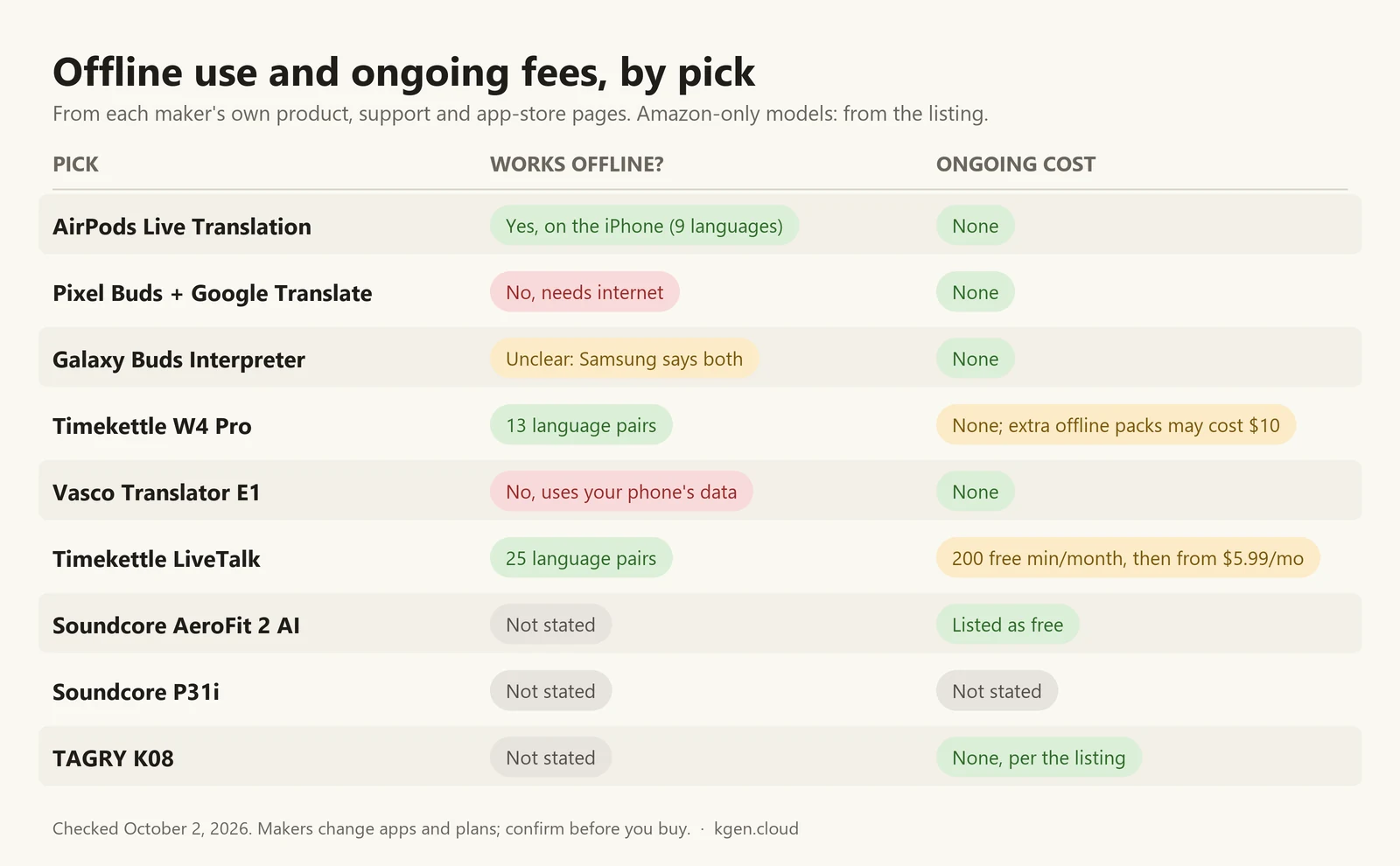
No subscription and offline use rarely come together. Here’s how the picks split, based on the makers’ own pages:
- No fee, works offline: AirPods Live Translation once languages are downloaded; Timekettle W4 Pro for its 13 offline pairs (check the pack fee above); the base Timekettle W4 for unlimited one-on-one translation.
- No fee, online only: Pixel Buds with Google Translate, the Vasco E1 on your phone’s data, and Paekole, whose listing says an “Internet connection is required.”
- No fee, offline not listed: the Soundcore AeroFit 2 AI (translation listed as free), plus TAGRY and Csasan, whose listings promise no subscription but don’t list an offline mode.
- Unclear: Galaxy Buds Interpreter, because Samsung’s own pages disagree (see above).
- Metered or paid: Timekettle LiveTalk after 200 minutes a month, and the W4 Plus Subscription Version at $14.99 a month for calls, media translation and AI features.
Are translation earbuds good?
Translation earbuds are good enough for travel, shopping, directions and small talk, and not reliable enough for anything where a wrong word has consequences. They’re great for asking a cab driver to skip the highway; they’re not something you want doing the talking at a lease signing. Reviewers who did test them point to three limits.
- Delay. AirPods and other app-based systems usually wait for the end of a phrase before they translate. Cult of Mac’s D. Griffin Jones described “the awkward pause” after someone finishes speaking, and Macworld found the stop-start rhythm tiring over a full conversation.
- Noise and accents. SoundGuys notes that “loud environments and uncommon dialects can hinder performance.” Google advises a quiet place with one person speaking at a time.
- Turn-taking. These aren’t simultaneous interpreters for a busy dinner table. Vasco asks speakers not to interrupt each other, and Apple and Samsung both disclaim the accuracy of their output.
Speed claims are hard to check
The W4 Pro is often credited with about 0.2 seconds of latency, and Paekole’s listing says “as fast as 0.3s.” Neither figure comes with a published test method. Macworld’s and Cult of Mac’s AirPods tests describe a noticeable wait, often until the speaker finishes a sentence. SoundGuys says the W4 Pro starts translating “quickly, without awkwardly long pauses” and lists about 0.2 seconds of latency, but doesn’t say how that figure was measured.
Who should not buy translation earbuds?
- Anyone who needs medical, legal or immigration interpretation. Use a qualified human interpreter; Apple and Samsung both disclaim the accuracy of their translations.
- Owners of an iPhone 15 Pro or later who only need Apple’s nine languages: try AirPods first.
- Android users who mostly need to understand others on tours or in lectures: Google Translate’s Live translate works with the headphones you already have.
- People who want one pair for music and calls and are looking at the Vasco E1, which isn’t designed for either.
- Speakers of less common languages who haven’t checked the maker’s full language table. Headline counts include accents, and offline packs cover far fewer languages than online modes.
For more sourced comparisons, browse all KGen guides, or read our affiliate disclosure to see how this site is funded.
Frequently asked questions
What are the best translation earbuds for iPhone?
AirPods with Live Translation, if you have an iPhone 15 Pro or later on iOS 26 and need one of Apple’s nine supported languages. AirPods 5 support it, and so do AirPods 4 with ANC, AirPods Pro 2 and 3, and AirPods Max 2. For other languages, Timekettle and Vasco earbuds work with iPhone through their own apps.
What are the best translation earbuds for Android?
Pixel Buds Pro 2 with the Google Translate app, which translates conversations in 40 languages with an internet connection. Galaxy Buds owners with a Galaxy AI phone get Samsung’s Interpreter. Google also says Translate’s Live translate works through any pair of headphones in more than 70 languages.
What are the best AI translation headphones?
For dedicated interpreter earbuds, the Timekettle W4 Pro is the strongest pick for calls and meetings, and the Vasco Translator E1 for two people sharing a pair. For everyday open-ear headphones that also translate, the Soundcore AeroFit 2 AI lists free translation in 100 languages through the soundcore app.
Do translation earbuds work offline?
Some do. Apple says Live Translation runs on the iPhone once languages are downloaded, and Timekettle lists 13 offline language pairs for the W4 Pro and 25 for LiveTalk. Samsung’s pages disagree about the Interpreter. Pixel Buds translation and the Vasco E1 on a phone need a connection, and the budget Amazon models we checked don’t list an offline mode.
Do translation earbuds need a subscription?
Most don’t, but read the fine print. Timekettle LiveTalk includes 200 online minutes a month, then sells plans from $5.99 a month. The W4 Plus subscription edition charges $14.99 a month for calls, media translation and AI features after a 7-day trial. Extra W4 Pro offline packs can cost $10 each.
Does the other person need to wear an earbud?
No. With AirPods, Pixel Buds, Galaxy Buds and most app-based models, the other person hears your translated words from the phone speaker or reads them on screen. Sharing an earbud, as the Vasco E1 and Timekettle W4 series are designed for, makes the conversation hands-free for both people.
Can translation earbuds translate phone calls?
Some can. AirPods Live Translation works on Phone app and FaceTime calls. Galaxy Buds4 translate calls in the Samsung Phone app on Galaxy S26 phones. Timekettle says the W4 Pro and LiveTalk translate calls without any app on the other end. The Vasco E1 isn’t designed for calls.
Sources
Prices and plan details were checked against these pages on . Vendors change pricing often, so confirm on the official page before you buy.
- Apple Support — Use Live Translation with your AirPods (published September 14, 2026)
- Apple — iOS feature availability: Live Translation with AirPods
- Apple Store — Buy AirPods 5 (US price)
- Apple Store — Buy AirPods Pro 3 (US price)
- Google Pixel Buds Help — Translate with Google Pixel Buds
- Google Store — Pixel Buds Pro 2 (US price)
- Google — “Transform your headphones into a live personal translator on iOS,” Sasha Kapur (March 26, 2026)
- 9to5Google — “Google Translate rolling out live translation using Gemini with any headphones,” Abner Li (December 12, 2025)
- Samsung US — Galaxy Buds4 (Live Translate, Interpreter, supported languages)
- Samsung US — Galaxy Buds4 Pro (US price)
- Samsung US — Galaxy AI (Interpreter footnote: language pack downloads)
- Samsung Newsroom — Galaxy S24 series launch (Interpreter works without cellular data or Wi-Fi)
- Samsung US support — Galaxy AI features with Galaxy Buds3, Buds3 Pro and Buds3 FE
- Samsung support — Real-time Interpreter on Galaxy Buds3 and Buds3 Pro (cloud processing)
- Timekettle — W4 Pro product page and FAQ
- Timekettle — W4 Plus one-time and subscription versions
- Timekettle — W4 product page
- Timekettle — LiveTalk product page and FAQ (minutes and plans)
- Apple App Store — Timekettle app, in-app purchase prices
- Vasco — Vasco Translator E1 store page and FAQ (US)
- Vasco — Vasco Translator E1 features and touchless mode
- Soundcore — AeroFit 2 AI Assistant
- Soundcore — P31i
- Soundcore community — AI translation launch post (December 5, 2025)
- Scarbir — Soundcore P31i review, Bart Breij (December 1, 2025)
- SoundGuys — The best translation earbuds in 2026, Tom Triggs (February 5, 2026)
- Macworld — AirPods Live Translation tested, David Price (December 19, 2025)
- Cult of Mac — AirPods Live Translation hands-on, D. Griffin Jones (October 6, 2025)