AI App Builders · Pricing guide · Updated
Appy Pie Pricing in 2026: What $16, $36 and $60 Per App Buy, and the Fees That Come Later
By KGen Research · Published · 13 min read · Some links are affiliate links; we may earn a commission at no extra cost to you. Disclosure
Short answer
Appy Pie’s app builder shows three plans at $16, $36 and $60 per app per month, each against a struck-through price twice as high, and the page does not say whether the lower figure requires annual billing. Only Platinum publishes to iOS. Removing Appy Pie branding costs twice your plan price, Apple and Google charge their own fees, and a cancelled app stops working.
How we researched this
This is a research guide, not a hands-on test, and we did not sign up, so anything that appears only after checkout is marked as unverified. Prices and rules come from Appy Pie’s App Builder pricing page, its Terms of Use (last updated July 11, 2025), its help articles and press releases, and the pricing pages of its other products, all read on October 3, 2026. Ratings are from Trustpilot, GetApp, Capterra, G2 and both app stores on the same day. Where a figure comes from a third party, we say so. We earn a commission if you buy Appy Pie through our link.
How much does Appy Pie cost in 2026?
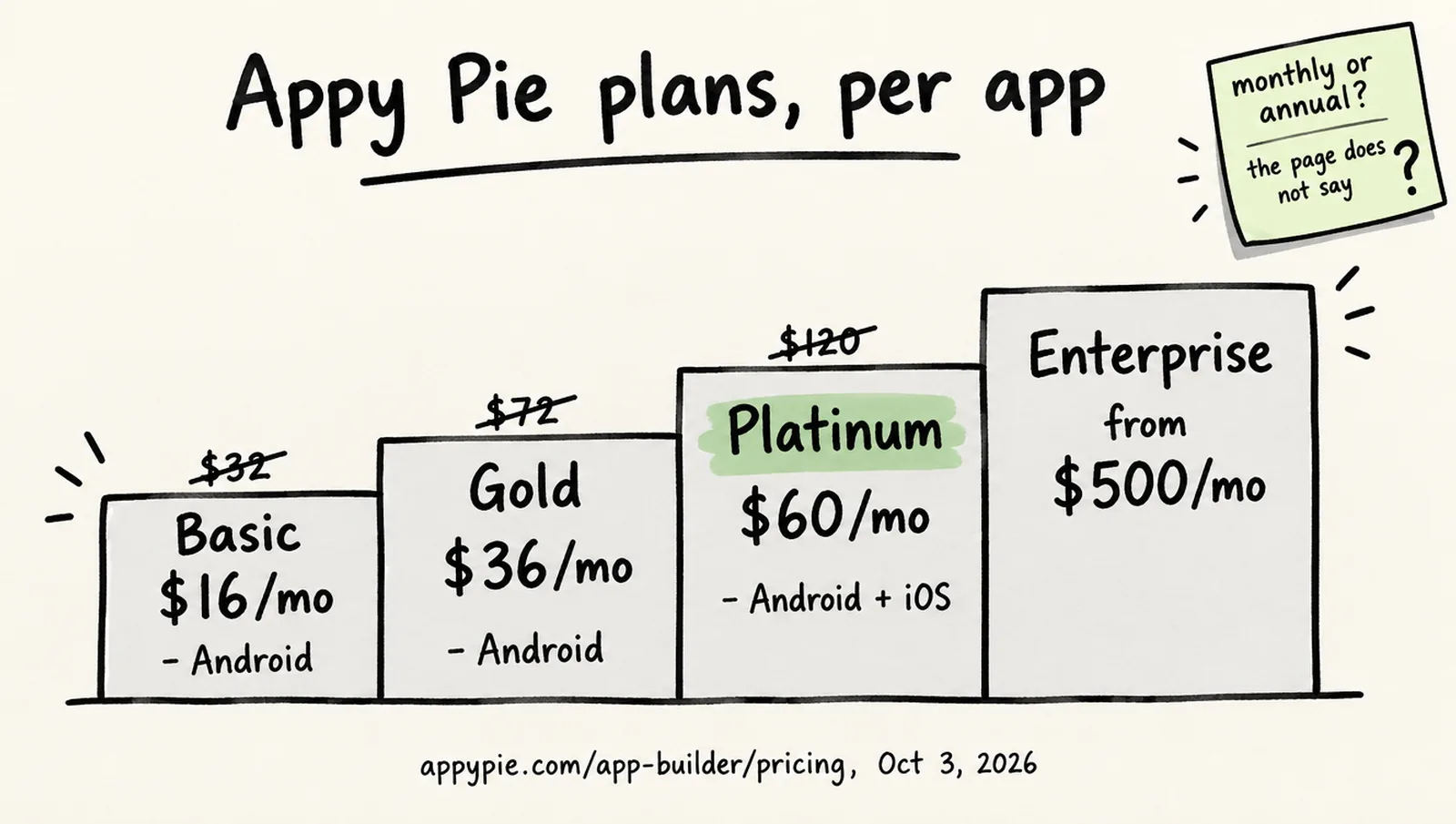
Appy Pie’s App Builder lists three self-serve plans, Basic at $16, Gold at $36 and Platinum at $60, each priced per app per month, plus an Enterprise tier sold through sales. Every card shows a second, struck-through figure above the live one: $32, $72 and $120. The page’s billing toggle reads “Monthly | Yearly (Save upto 20%)” with Monthly selected by default, and no card says “billed annually” or “billed monthly.” What the live prices buy is set out below; what they actually require at checkout is the subject of the next section.
| Plan | Price shown | Struck through | Platforms | Push notifications a month | App downloads a month | Support |
|---|---|---|---|---|---|---|
| Basic | $16 per app per month | $32 | Android | 500 | 500 | |
| Gold | $36 per app per month | $72 | Android | 1,000 | 1,000 | Email and chat |
| Platinum | $60 per app per month | $120 | Android and iOS | 2,000 | 2,000 | Email, chat and call |
| Enterprise | Contact sales; Fully Managed plans from $500 a month | — | Android and iOS | Unlimited | Unlimited | 24/7, custom SLAs |
Appy Pie’s homepage says publishing needs “a paid plan starting at $16/month” and its AI-builder page lists a starting price of $16 a month, neither with a billing qualifier, and the Enterprise card links to Fully Managed Plans: a Team plan “starting $500/mo” for 10,000 downloads and 100,000 pushes a month with a dedicated account manager, and a Company plan “starting $1000/mo” for ten times those limits. For context, a 2024 review listed Business, Gold and Platinum at $16, $36 and $60, and a 2020 review listed Basic at $18 with a 5,000-download cap; the download allowances have since been cut to 500, 1,000 and 2,000. We could not date either change.
Is $16 the monthly price or the annual price?
Appy Pie’s page does not say, and the two readings lead to very different bills. Taken at face value, with the Monthly tab selected, the page says Basic is $16 a month and $32 is a crossed-out old price. Three third-party pricing pages updated in 2026, including one published by Emergent, itself an app builder, read the same pair as $32 month to month and $16 a month on annual billing. The toggle’s own label, “Save upto 20%,” does not match a 50% gap, which argues against the annual reading; the crossed-out $120 for Platinum, exactly double, argues for a promotion rather than an annual discount. The yearly figures are not in the page’s code, so we could not confirm what the Yearly tab shows without signing up. One GetApp reviewer’s complaint gives a hint of what buyers encounter: “I’m not paying your annualised ‘monthly’ subscription $144 to try something out.” Until Appy Pie labels the price, plan on two scenarios: $16 a month if the display is literal, or $192 up front for a year of Basic if the third-party reading is right, and read the checkout total before you confirm.
What do Basic, Gold and Platinum include?
All three paid tiers include unlimited hosting and bandwidth, unlimited editing, no Appy Pie ads, Google Analytics, monetization through ads and in-app purchases, and first-time store submission support; what separates them is platform, allowances and support. Basic and Gold publish to Android only: the page states “Our Basic plan supports Android,” and the iOS column appears on Platinum alone. The pricing page mentions PWA output only in passing, in Basic’s note about an “ad-free PWA and Android app,” and lists no PWA line on any plan card. The AI app generator, in open beta since January 15, 2026, is not metered separately: Appy Pie says you can “build, preview, and iterate on apps for free” and pay only to publish, and the only metered items on the pricing page are push notifications and downloads.
The billing unit is the app, not the account. The pricing page is explicit: “You can create an unlimited number of apps with your Appy Pie account, but for each app you make, you need to have a separate subscription plan in place.” A client with a customer app and a staff app on Platinum pays $120 a month at the displayed rate before any add-on. The page also notes that none of the self-serve tiers removes Appy Pie’s branding, which is the next section.
How much does removing Appy Pie branding cost?
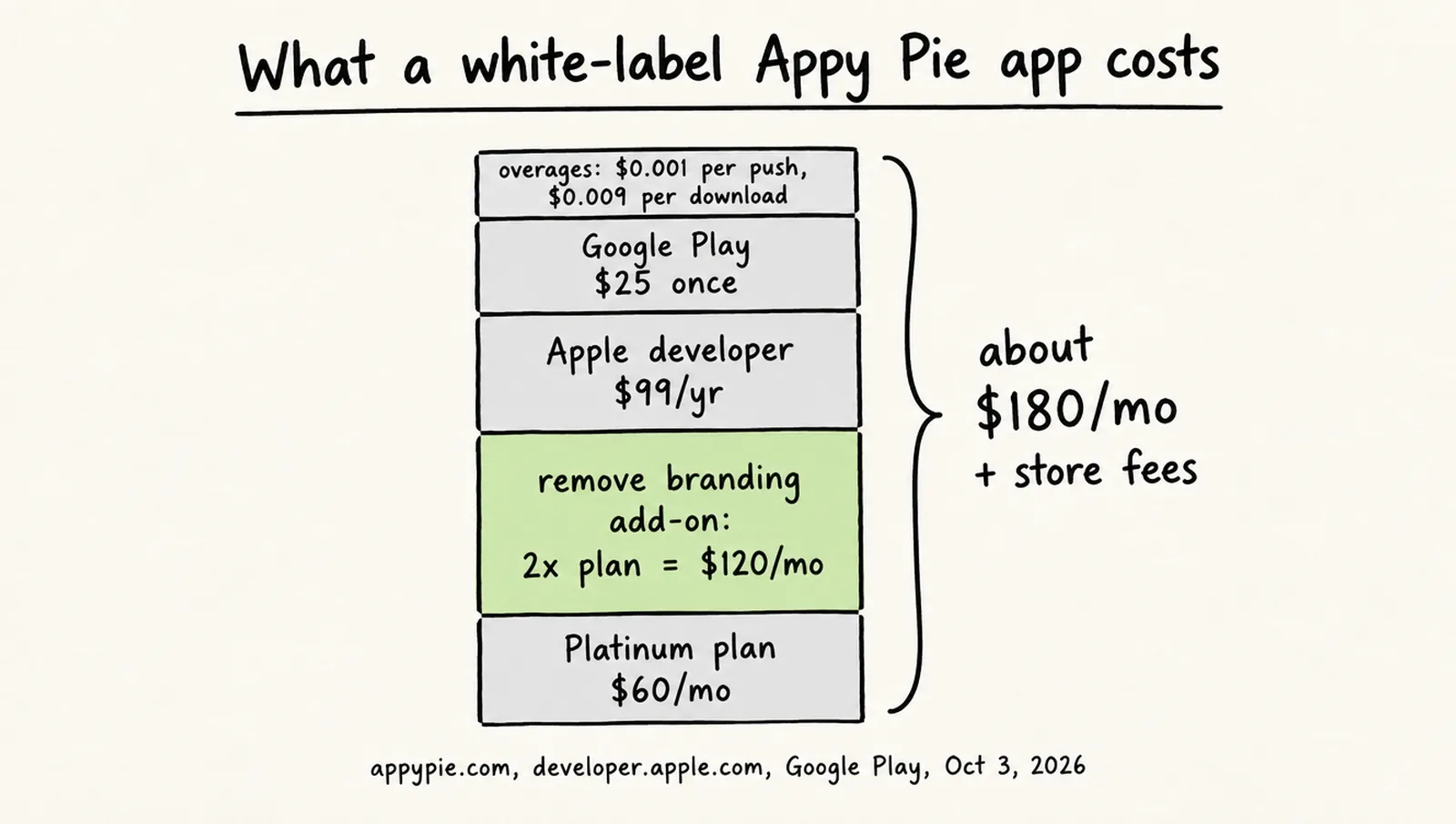
Twice your plan price, on top of your plan. The pricing page says “Remove Appy Pie Branding (your own white label app)” requires the Add-On Package, “which is 2x your current app plan price,” and the package lists two benefits: a white-label app and a dedicated account manager. At the displayed rates a white-label Platinum app is $60 plus $120, or $180 per app per month; at the struck-through rates it would be $120 plus $240. Adalo includes branding removal on its $36 Starter plan; the other builders’ pricing pages we checked do not state a white-label price, and none prices it as a multiple of the plan. Appy Pie’s own homepage muddies this further: it says that to publish to the stores “or to remove the Appy Pie badge, you need a paid plan starting at $16/month,” which does not match the pricing page’s add-on. The pricing page is the more specific document, so plan on the add-on; it is the largest single difference between Appy Pie’s advertised price and what a business app costs.
What other fees does Appy Pie charge?
Several, and most are documented on the pricing page or in the Terms rather than on the plan cards:
- Store fees you pay the stores. Apple’s Developer Program is $99 a year and Google Play’s registration is a one-time $25. Appy Pie restates both and adds, “Yeah, we know we wish it were free, too.”
- Overages. “For Push Notifications, the cost is $0.001 / extra unit. For App Downloads, the cost is $0.009 / extra unit.” On Basic, 1,000 extra downloads in a month is $9, more than half the plan price.
- Support beyond onboarding. Three interactive sessions are included; after that “every additional interactive session will come at the cost of $25/hr with a minimum package of 10 hours,” so the first extra hour is a $250 commitment.
- Resubmissions. Initial submission is included; “additional resubmissions may incur standard service charges,” with no price published, and refunds “are not applicable on rejection of your application from any App Store.”
- Android permission changes. The Terms set “a one-time charge of $99 each time you wish to add/remove permissions in your .apk.”
- Done-for-you work. A “Build it for Me” payment of $499 is treated as a custom project and is non-refundable once paid; the Terms list it, but we found no public product page.
- Consumables. The Terms name domain registration, premium images, app promotion, extra hosting and bandwidth, submissions, account managers, push notifications and more as non-refundable add-ons, and warn that if one is depleted and not topped up “this will lead to your app being locked.”
- Penalties. A $100 chargeback fee, payable before service is restored, and a 3% deduction (or the processor’s fee, whichever is higher) from any refund.
Prices are exclusive of taxes, there is no setup fee, and Appy Pie accepts about twenty currencies by card, PayPal or local online banking, though its US page shows USD only and we found no regional price list.
How does the Appy Pie free trial work?
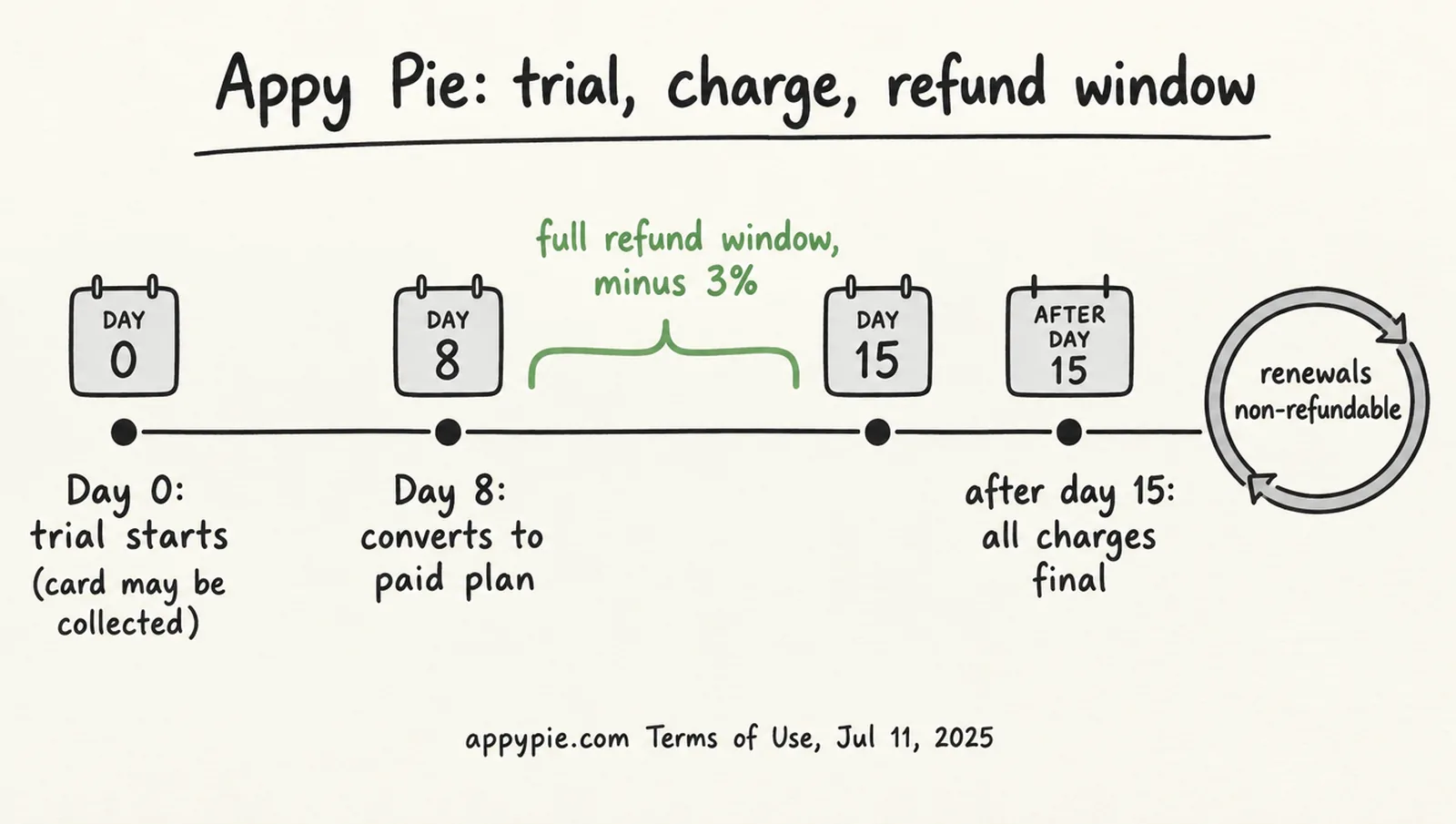
It is a 7-day trial “for your personal, non-commercial use,” and the Terms say it converts to a paid plan on the eighth day unless you cancel. Appy Pie’s homepage advertises “No credit card • 7-day free trial • Cancel anytime,” and a November 2025 press release described a no-card trial as a “limited-time” offer. The Terms of Use, last updated July 2025, describe the opposite flow: “Your credit card information will be collected to initiate a trial account,” and “if you do not cancel before the trial expires, your subscription will automatically convert into a paid plan on the 8th day.” Which flow a given visitor gets today could not be confirmed without signing up. If a card is requested, expect a temporary hold of up to $1.00 that Appy Pie says it removes after verifying the card; there is no $1 trial product. You can cancel the trial from the dashboard or by emailing support before the seven days end.
Can you get a refund from Appy Pie?
Only within seven days of the first charge after a trial, and never on a renewal. The refund clause in the Terms reads: “if you are charged following your free trial and do not wish to continue, you may request a full refund within seven (7) days of the charge date by contacting our support team … After this window has expired, all subscription charges are final and non-refundable.” Renewal fees “are non-refundable once processed,” cancellation “takes effect on your next billing cycle,” and the Terms add a line worth taking seriously: “Please sign up for a monthly payment schedule if you are unsure of how long you will be using the service.” Refunds lose 3% to processing and take five to ten business days, up to thirty depending on the bank. Appy Pie’s older refund-policy page now returns a “gone” error; the Terms are the current rule.
What reviewers report about refunds
The Terms are clear, and several 2025 and 2026 Trustpilot reviewers describe a different experience: a trial that “was charged without my consent” (July 2025), a refund that was refused “unless I removed my previous review” (June 2026), and “an explicit offer to expedite my refund only if I took the review down first” (2026). These are individual accounts, not a measured share. They are a reason to cancel inside the window and keep the confirmation.
What happens to your app if you cancel?
It stops working. The pricing page says that “once you have cancelled your subscription, your app would be locked,” and its FAQ adds that the app “will stop functioning”; reactivation is allowed. Because apps run on Appy Pie’s hosted infrastructure with no code export (“You don’t get a Git repo”), there is no way to keep a published app alive on your own servers. Non-payment has the same effect: after four failed charges a yearly plan converts to monthly, after four more to weekly, and after four more the subscription is cancelled, with the app “locked for editing and viewing purposes” and past-due fees sent to collections. A 2021 help article offers an alternative to cancelling: you can pause a subscription “for a certain period,” pay nothing while paused, and keep your existing price when you return. The cancellation path is the app’s overview page, then Billing Info, Your Subscriptions, the cogwheel and Cancel Subscription.
What do Appy Pie’s other products cost?
Appy Pie’s other tools have been rebranded, which makes their prices hard to find from appypie.com. Appy Pie Design is now Pixazo, Appy Pie Automate (formerly Connect) is now Flozic, and Appy Pie Chatbot is now Flozic Agents; the old URLs redirect. Entry prices on October 3, 2026:
| Product | Free tier | Entry paid plan | Note |
|---|---|---|---|
| Website Builder | Trial, no card | Starter $36 a site a month; Grow $60 | Annual prices not displayed; Google Workspace free for the first year only |
| Flozic Integrate (was Automate) | Freemium, “everlasting” | Standard $9 a month, or $8 billed annually, 8,000 tasks | Professional $29, Business $96; 7-day trial |
| Flozic Agents (was Chatbot) | 14-day trial, no card | “Usage-based pricing”; no price list published | The agents pricing URL returns a 404 |
| Pixazo (was Design) | Free, 100 trial credits, no commercial rights during the trial | Pro $15 a month or $120 a year, 300 credits | API from $0.0003 per image |
What do users say about Appy Pie billing?
Appy Pie’s review scores are high and its billing complaints are specific and repeated. The scores first:
| Platform | Score | Count | Note |
|---|---|---|---|
| Trustpilot | 4.6 / 5 | 4,431 | 92% five-star, 2% one-star; newest visible review July 9, 2026 |
| G2 | 4.7 / 5 | About 1,390 | |
| GetApp | 4.6 / 5 | 1,389 | Value for money 4.5; 19 one-star reviews |
| Capterra | 4.6 / 5 | 1,392 | “71% negative reviews describe payment and subscription processes as confusing with challenging cancellations” |
| Google Play (builder app) | 3.9 / 5 | 376,000 | “You will need a subscription to keep your app published” |
| Apple App Store (builder app) | 4.3 / 5 | 630 | In-app purchase “Mobile Monthly Plan $60.00” |
The five-star reviews on Trustpilot are short and often name a support agent; the one-star reviews cluster around five themes. Renewals after a confirmed cancellation: “Despite receiving written confirmation that our cancellation had been accepted … Appy Pie processed an unauthorised renewal charge without any prior notification” (South Africa, mid-2026); “Been trying to close my account for over a year … All I get is another payment” (Australia, August 2025). Trials that converted: “Won’t refund you if you don’t cancel before 7 day free trial ends” (UK, July 2025); on GetApp, “Signed up for 7 day trail and cancelled the subscription right away, but got charged for a platinum subscription after seven days.” Done-for-you projects paid and not delivered, at $3,600 and $6,500. Upsells after purchase: “telling one price … put mandatory add ons” (May 2025). And pressure to delete reviews, quoted above. Capterra’s summary of its own negative reviews, with 71% about payment and cancellation and 39% about price, is the closest thing to a measured share. The Trustpilot profile also shows no review newer than July 9, 2026 on a 4,431-review account, a three-month gap we cannot explain.
Affiliate link — we may earn a commission at no extra cost to you.
See Appy Pie plans and start the 7-day trialHow does Appy Pie compare with other app builders on price?
At its displayed price Appy Pie is among the cheapest ways to publish a native Android app, and among the most expensive ways to publish a white-label one on both stores. The entry prices below are from each vendor’s own page on October 3, 2026; most are billed annually, so compare like with like.
| Builder | Entry paid plan | Publishes to iOS at entry? | Branding removed at entry? |
|---|---|---|---|
| Appy Pie | Basic $16 per app a month (billing period unlabeled) | No; Platinum $60 | No; add-on at 2x plan |
| Adalo | Starter $36 a month billed annually | Yes | Yes |
| Thunkable | Builder $37 a month billed annually ($59 monthly) | Yes, 1 live app | Not stated |
| Glide | Basic $25 a month | Web apps | Not stated |
| Base44 | Starter $16 a month billed annually | Web apps | Not stated |
| Lovable | Pro $25 a month ($21 billed annually) | Web apps; code export | Not stated |
| Bubble | Starter $59 a month billed annually | Web and native | Not stated |
Adalo is the closest like-for-like: its $36 Starter publishes one app to both stores without Adalo branding, which on Appy Pie needs Platinum plus the add-on, $180 a month at displayed prices. Base44 and Lovable are cheaper for web apps and are covered in our Base44 vs Lovable comparison and Base44 pricing guide; the Base44 alternatives roundup places Appy Pie among builders chosen for native mobile output.
Verdict: which Appy Pie plan should you pick?
- Basic ($16 displayed) only for an Android app where Appy Pie’s branding is acceptable and 500 downloads a month is enough: an internal tool, a club or a test. Confirm at checkout whether $16 is monthly or a year paid up front.
- Skip Gold. It is still Android only; the extra $20 buys 500 more pushes and downloads and chat support, and overages on Basic would cost less than that for most apps.
- Platinum ($60 displayed) is the first plan that publishes to the App Store, and the only self-serve plan most businesses can use. Budget $180 per app per month if the app must not carry Appy Pie branding, plus $99 a year to Apple and $25 to Google.
- Compare Adalo first if you need both stores and your own brand at the entry price; Thunkable publishes to both stores at $37 but its page does not say whether branding is removed. Prefer a code-exporting builder if you ever want to leave; Appy Pie apps cannot be exported and stop working when the subscription does.
- Whatever you choose, start on monthly billing, which the Terms themselves recommend, set a reminder for day five of the trial, and keep the cancellation confirmation.
Frequently asked questions
Is Appy Pie free?
Not for publishing. Appy Pie says you can build and preview an app for free and that publishing needs “a paid plan starting at $16/month,” and its App Builder pricing page offers a 7-day trial rather than a free tier. Separate Appy Pie products do have free plans: Pixazo (the former Appy Pie Design) has a free tier and Flozic Integrate (the former Appy Pie Automate) calls its freemium plan “everlasting.”
Does Appy Pie publish to the App Store and Google Play?
Platinum publishes to both. Appy Pie’s pricing page says “Our Basic plan supports Android,” Gold is also Android only, and only Platinum adds iOS. Apple’s $99 a year developer membership and Google’s one-time $25 fee are paid by you to Apple and Google; Appy Pie includes first-time submission support but says final approval “decisions are made by the respective app stores” and refunds do not apply to rejections.
Can I build more than one app on one Appy Pie plan?
No. Appy Pie’s pricing page states that you can create unlimited apps in your account, “but for each app you make, you need to have a separate subscription plan in place.” Two published apps on Platinum are two Platinum subscriptions. Enterprise is the only tier whose card lists “Unlimited App Creation”; the Fully Managed plans it links to, from $500 a month, are described by download and push limits, not by app count.
Do I own the code, and can I export my Appy Pie app?
You can’t export it. Appy Pie’s AI app generator page says “Apps run on Appy Pie’s hosted infrastructure. You don’t get a Git repo.” The pricing page says a cancelled subscription locks the app, so there is no path to running an Appy Pie app elsewhere. Builders that export code, such as Lovable, are covered in our Base44 alternatives guide.
Does Appy Pie charge a setup fee or have hidden fees?
There is no setup fee, and prices exclude tax. The fees that are not on the plan card: the white-label add-on at twice your plan price, overages at $0.001 per push notification and $0.009 per download beyond your allowance, support beyond three onboarding sessions at $25 an hour with a 10-hour minimum, $99 to change Android permissions, a $100 chargeback fee, and a 3% deduction on any refund.
Is Appy Pie legit?
Yes. Appy Pie LLP is an Indian company founded by Abhinav Girdhar, in public use since 2013 (its About page dates the company to 2016), with Trustpilot 4.6/5 from 4,431 reviews and G2 4.7/5. The complaints are mostly about billing: Capterra’s summary of its negative reviews says 71% describe payment and cancellation as confusing and 45% report technical or usability problems, and 2025 and 2026 Trustpilot reviews report renewals after a confirmed cancellation. Read the Terms before you start the trial.
Sources
Prices and plan details were checked against these pages on . Vendors change pricing often, so confirm on the official page before you buy.
- Appy Pie — App Builder pricing page
- Appy Pie — homepage (trial and “starting at $16/month” claims)
- Appy Pie — AI app generator (no code export)
- Appy Pie — Fully Managed Plans (Team and Company tiers)
- Appy Pie — Terms of Use (updated July 11, 2025)
- Appy Pie FAQ — benefits of the Add-On Package
- Appy Pie FAQ — is there a cost for resubmitting a rejected app
- Appy Pie FAQ — why did Appy Pie charge $1 to my card
- Appy Pie FAQ — how can I cancel my subscription
- Appy Pie FAQ — how long do I wait for a refund
- Appy Pie — Website Builder pricing
- Flozic (formerly Appy Pie Automate) — Integrate pricing
- Flozic — AI Agents
- Pixazo (formerly Appy Pie Design) — pricing
- Apple — Developer Program enrollment ($99 a year)
- Google — Play Console registration fee ($25)
- Appy Pie — press release: 7-day free trial, no credit card (November 14, 2025)
- Appy Pie — press release: AI prompt-based app builder in open beta (January 15, 2026)
- Trustpilot — Appy Pie LLP
- GetApp — Appy Pie reviews
- Capterra — Appy Pie reviews
- G2 — Appy Pie (comparison page showing the rating)
- Google Play — AI App Maker Builder Appy Pie
- Apple App Store — AI App Builder Appy Pie
- eWeek — Appy Pie review (August 22, 2024; earlier plan details)
- Emergent — Appy Pie pricing (third-party reading of monthly vs annual, September 7, 2026)
- Base44 — pricing
- Lovable — pricing
- Adalo — pricing
- Thunkable — pricing
- Bubble — pricing
- Glide — pricing