AI Video · Pricing guide · Updated
CapCut Pro Pricing in 2026: What It Costs, What You Get, and the Fees CapCut Does Not Advertise
By KGen Research · Published · 13 min read · Some links are affiliate links; we may earn a commission at no extra cost to you. Disclosure
Short answer
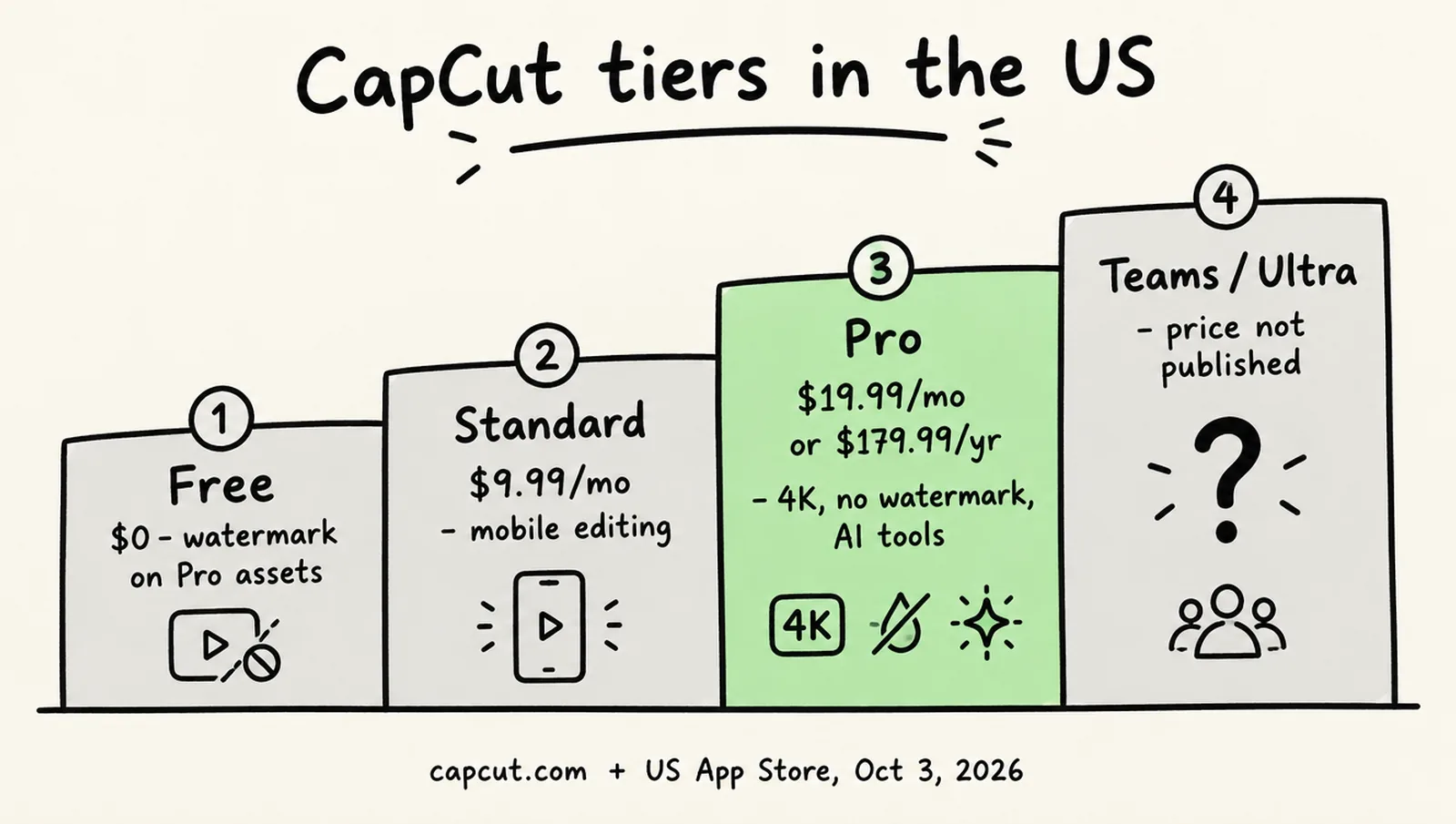
CapCut Pro costs $19.99 a month on CapCut’s own pages and the US App Store, or $179.99 a year, about $15 a month, on CapCut’s article. A Standard tier at $9.99 a month covers mobile editing without the AI suite. The free app still edits, with a watermark on exports that use Pro assets, and the 7-day Pro trial needs a payment method.
How we researched this
This is a research guide, not a hands-on test. CapCut publishes no price sheet, so prices come from CapCut’s own Standard vs Pro article, its help center and terms, and the in-app purchase lists on the US, UK, German and Vietnamese App Stores, all checked on October 3, 2026. We did not sign in to CapCut’s web checkout, so US web prices are marked as unverified. Where CapCut’s own pages contradict each other, we quote both. Our arithmetic is labeled. We earn a commission if you subscribe to CapCut through our link.
How much does CapCut Pro cost in 2026?
CapCut Pro costs $19.99 a month or $179.99 a year for individual users in the United States. CapCut does not publish a price sheet. Its help page on the subject says only that pricing “can vary depending on your region, device, and available promotions” and points you to the Upgrade button. The numbers come from two CapCut sources that agree: the company’s “CapCut Standard vs Pro” article, re-dated September 23, 2026, which states “$19.99 per month for individual users” and “$179.99 per year,” and the US App Store listing, whose in-app purchase list shows “Pro Monthly Subscription $19.99” and “Standard Monthly Subscription $9.99.” The annual price works out to $15.00 a month, which is $59.89, or 25%, less than twelve monthly payments; that comparison is our arithmetic.
| Plan | US price | Where CapCut states it |
|---|---|---|
| Free | $0 | Terms of Service (“Free Services”) |
| Standard, monthly | $9.99 | US App Store in-app purchase “Standard Monthly Subscription” |
| Standard, yearly | Not listed for the US | Vietnam’s App Store lists a “Standard Yearly Subscription,” so the plan exists somewhere |
| Pro, monthly | $19.99 | Standard vs Pro article; US App Store “Pro Monthly Subscription” |
| Pro, yearly | $179.99 (about $15 a month) | Standard vs Pro article only; no App Store item carries this label |
| Teams | “Starts at around $24.99 per month,” or “$15–$30 per seat per month when billed annually” | Two CapCut pages that disagree; see Teams below |
| Ultra | Not published for the US | CapCut confirms the tier exists; see Ultra below |
The US App Store list also contains three items CapCut does not label: a “Monthly Subscription” at $19.99, a “Yearly Subscription” at $89.99 and a “Monthly Subscription” at $7.99. Two independent pricing trackers read the $89.99 and $7.99 items as old Pro prices left on the store, and neither could confirm it. Vietnam’s store labels its equivalent item “Standard Yearly Subscription,” which suggests the $89.99 may be Standard’s annual price. CapCut has not said, so do not assume that $89.99 buys a year of Pro.
What do Free, Standard and Pro include?
Pro is the only tier with the full AI suite, 4K export and cloud storage of any size; Standard is a mobile-focused step between it and the free app. CapCut’s help page on the two paid tiers says Standard “editing is primarily focused on mobile devices,” while Pro covers “mobile, desktop, and web platforms.” The table collects what CapCut’s own pages say each tier includes, with the places where they disagree noted.
| Free | Standard | Pro | |
|---|---|---|---|
| Platforms | Mobile, desktop, web | “Primarily focused on mobile devices” | Mobile, desktop and web |
| Cloud storage | None; the 1 GB free allowance was discontinued in August 2024 | 100 GB | 1 TB on the April and September 2026 pages; two older help pages still say 100 GB |
| AI tools | Preview only | Basic: AI effects, noise reduction, loudness adjustment | Camera tracking, auto captions, AI avatars, AI image and video generation, AI music |
| Templates and assets | Free templates; Pro-tagged items locked | Free templates plus Standard (blue-diamond) items | “Unlimited premium templates, commercial-use assets” |
| 4K and 60fps export | Locked on desktop; grayed out for non-Pro users | Not stated | Included |
| Watermark | On any export that uses Pro materials, “even at 1080p” | Not stated | None |
| Export length | Pro prompt above about 15 minutes; limit varies by region | Not stated | Not stated |
| Collaboration | No | No | Team templates, brand libraries, review workflows |
Two things in that table need care. CapCut’s export help page treats 1080p as available to free users; the watermark rule is about content, not resolution. CapCut’s export help page says “watermark removal on videos using Pro materials always requires Pro, regardless of resolution,” so a free export is clean only if the project uses no Pro template, effect or asset. And auto captions are listed as a Pro feature on CapCut’s plan comparison pages, while CapCut’s own captions landing page still calls them “free automatic subtitles”; which applies may depend on region, platform and caption style. CapCut explains the general drift of features into Pro plainly: tools that “were offered as part of a limited-time free trial” were moved “into the Pro subscription tier” once the trial ended.
How many AI credits does CapCut Pro include?
CapCut’s own pages do not agree, and the number you can quote with confidence is 1,200. The restructure notice says Pro’s monthly AI points went “from 550 to 1200.” CapCut’s Credit Rules then state that “all Pro members, regardless of their subscribed Pro plans, get the same subscription credits every subscription month.” A help page dated March 24, 2026 says the opposite: “subscribers of different Pro plans do not receive the same amount of monthly subscription credits,” and shows a web dashboard reading “Credits this month: 60” for an annual subscriber against 40 for a monthly one, with the note “Annual subscribers receive 50% more credits each month.” Nothing on that page reconciles 60 with 1,200. A May 2025 announcement in the Philippines cited 1,600. We could not resolve this from CapCut’s pages, and the only place that shows your real balance with expiry dates is the web version; CapCut says the mobile app gives “zero visibility into subscription credit timelines.”
CapCut’s Credit Rules say subscription credits last one subscription month and are spent first, then activity credits, then purchased credits, though one help page lists purchased credits before activity credits. Purchased credits cost $4.99 per 100 on CapCut’s credit-types page, last two years under the Credit Rules (another help page says they typically do not expire), and “cannot be refunded or exchanged to cash.” AI video generation with Seedance 2.5 “is billed by second,” and CapCut publishes no table of credits per clip. The only figures are third-party: a desktop estimate from August 2026 showed 60 credits for a five-second Seedance 2.0 Fast clip and 75 for Seedance 2.0, and another tracker estimates 96 to 120 credits for eight seconds. At those rates 1,200 credits would be roughly 16 to 20 short clips a month before retries, which is our arithmetic on numbers CapCut has not confirmed. If AI generation is the reason you are paying, a credit-metered generator may suit you better; our InVideo AI review covers one.
How does the CapCut Pro free trial work?
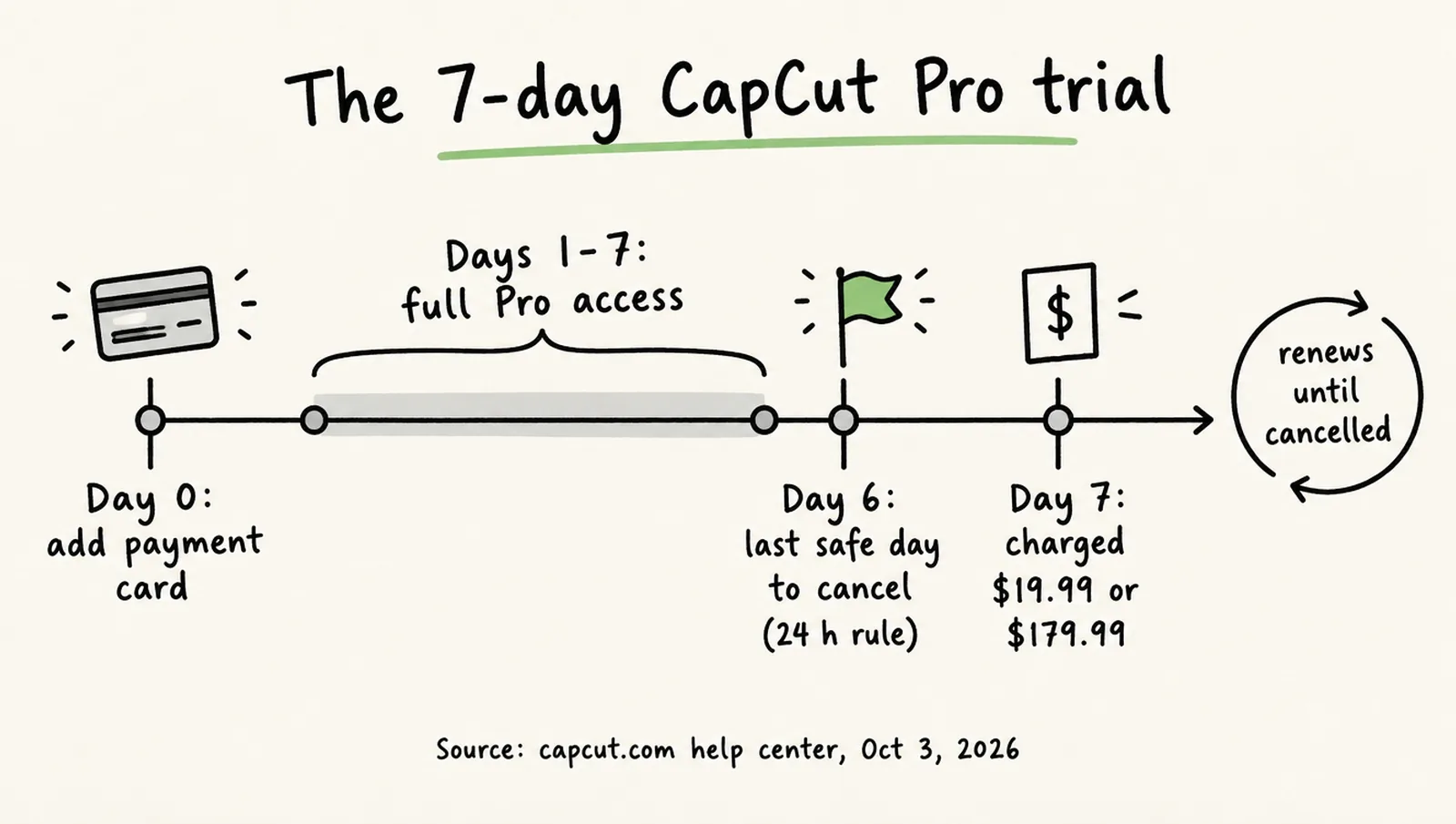
CapCut offers a 7-day free trial of Pro to “eligible new users in supported regions,” and it requires a payment method. CapCut’s trial page says the card “is required to verify eligibility, but you won’t be charged until the trial ends,” and that on mobile “your store account will be charged automatically after 7 days unless canceled.” Eligibility is strict: you must never have had “an active Pro subscription (including past trials),” the trial is “not offered in all countries,” and “on iOS, Apple may limit one free trial per user per lifetime for certain apps.” The button reads “Try 7 Days Free” on iOS, “Start Free Trial” on Android and “Start 7-Day Free Trial” on the web. A July 2026 observation of the UK web checkout showed the trial followed by a discounted first month (“£0 for 7 days, then £4.39 first month”) before the full £21.99 renewal, so read the full sequence on the checkout screen, not just the first line. One Trustpilot reviewer in late September 2026 reported a $1.10 charge on a “free” trial; CapCut’s pages describe no verification charge, and we could not establish what it was.
Is CapCut Pro cheaper on the web than in the app stores?
Not by any margin we could confirm, and the widely repeated claim that the web is 20 to 30% cheaper rests on prices that no longer exist. The argument is that Apple and Google take a commission, so CapCut charges less on its own site. In the UK, the only market with a published web checkout observation, Pro monthly on the web was £21.99 in July 2026, exactly the UK App Store price. In the US, the App Store’s $19.99 is the same figure CapCut publishes in its own article. We did not sign in to the US web checkout, so a US web price remains unverified; Google Play shows only a price range per item (as read on October 1, 2026), so Android item prices are unverified too. The pages that quote web Pro at “$7.99 to $9.99 a month” are describing the structure CapCut replaced in 2025 and 2026. What the web version does offer is visibility: CapCut says only the web shows credit types, sources and expiry dates, and that Teams can be bought only through CapCut Online. Whichever channel you use, CapCut sets your currency from the country of your App Store or Google Play account.
Why does CapCut Pro cost different amounts by country?
CapCut prices by region, and the gaps are large. CapCut attributes the differences to taxes, exchange rates and “regional pricing strategies.” The table shows the in-app purchase items on four App Store fronts on the same day, plus press and third-party figures where no store listing exists.
| Market | Standard, monthly | Pro, monthly | Pro, yearly | Other |
|---|---|---|---|---|
| US (App Store) | $9.99 | $19.99 | $179.99 (CapCut article) | Unlabeled items: monthly $19.99, yearly $89.99, monthly $7.99 |
| UK (App Store) | £10.99 | £21.99 | £199.99 (web, July 2026) | Unlabeled App Store items: yearly £99.99, monthly £10.99; web first month £4.39; Ultra £55 a month after intro; Teams £13.49 a seat |
| Germany (App Store) | €11.99 | €23.99 | Not listed | Unlabeled items: yearly €109.99, monthly €9.49 |
| Vietnam (App Store) | 117,000₫ | 222,000₫ | Not listed | “Standard Yearly Subscription” 700,000₫ |
| Philippines (press, May 2025) | ₱359 | ₱719 | ₱4,299 | Restructure took effect May 22, 2025 |
| Malaysia (press, June 2026) | — | — | — | Ultra RM198 a month in promotion, then RM329.90 |
| India | Not listed; the India App Store URL returns a 404, consistent with the 2020 ban | |||
At rough exchange rates the UK pays about 40% more than the US for Pro monthly, Germany about 25% more, and Vietnam less than half, which is our conversion rather than a CapCut figure. Because CapCut ties your currency to your store account’s country, the price you see is the one for the country your Apple ID or Google account is registered in.
What are CapCut Teams and CapCut Ultra?
Teams is a per-seat plan whose own help page contradicts itself, and Ultra is a higher AI tier whose US price CapCut has not published. CapCut’s Teams page, dated March 25, 2026, says Teams “can only be purchased and managed through CapCut Online” and, a few lines later, that “purchasing a Teams subscription plan is not available on the online platform.” It prices Teams at “$15–$30 per seat per month when billed annually,” while the Standard vs Pro article says Teams “starts at around $24.99 per month.” Price depends on seat count (3, 5, 10 or custom), billing period, with annual plans “typically” about 20% cheaper, and region. A third party saw Teams on sale on the UK web checkout in July 2026 at £13.49 a seat a month after a discounted first month, so it is purchasable at least there. In Teams, subscription credits are shared across the team while activity and purchased credits stay personal.
Ultra exists: CapCut’s August 7, 2026 post on Seedance 2.5 says the model “is used by Pro and Ultra members through Credit consumption.” The only priced description is Malaysian press coverage from June 2026, which put Ultra at RM198 a month in promotion (RM329.90 after) with “monthly credits of around 40795,” 1 TB of storage and “full access to all AI-powered editing features.” The UK web checkout showed Ultra at £55 a month or £529 a year after introductory pricing. No CapCut help page documents Ultra’s inclusions or a US price, and two pricing trackers decline to publish one for that reason; so do we.
Why did the CapCut Pro price go up?
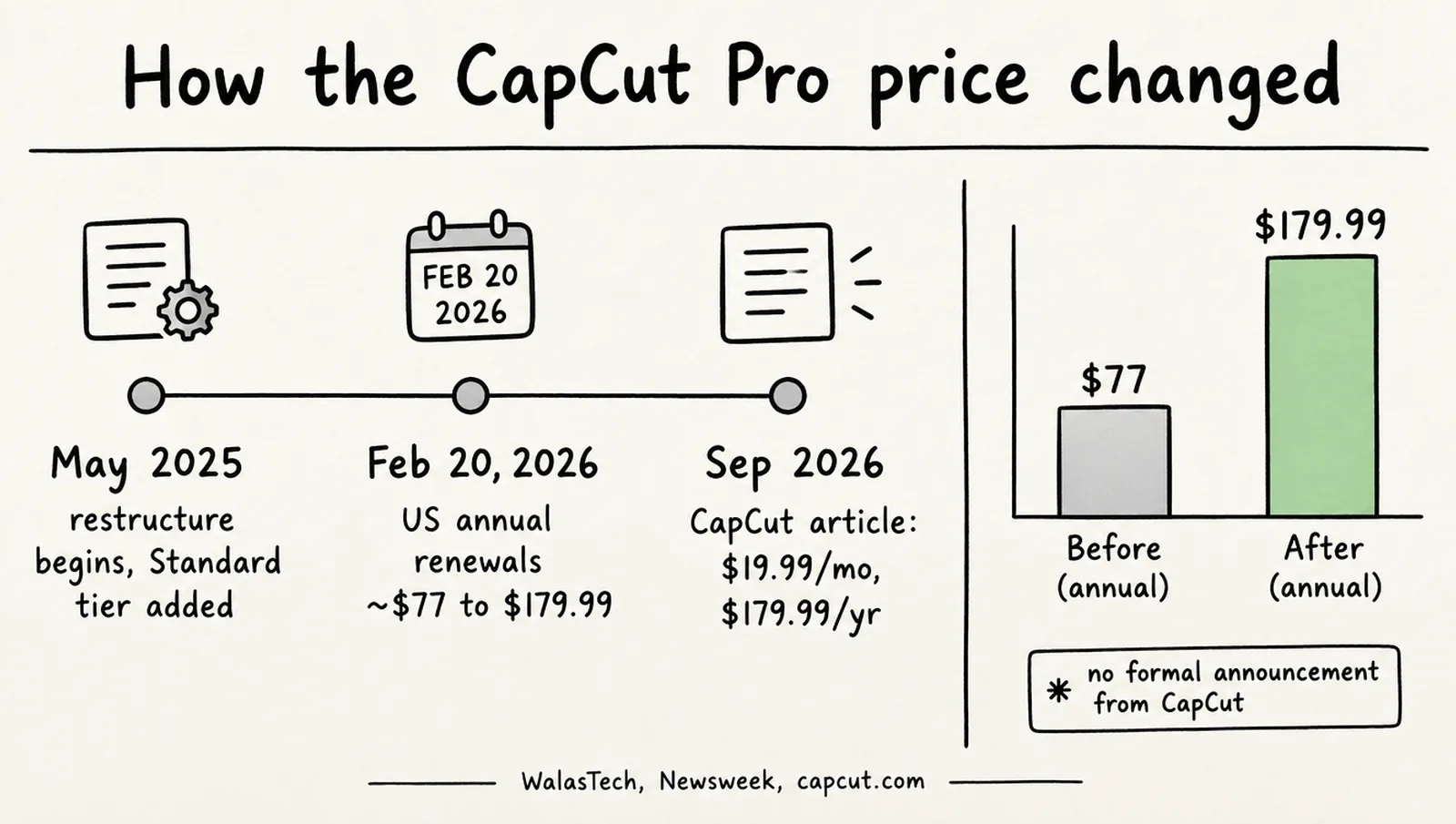
CapCut restructured its plans between May 2025 and February 2026, adding the Standard tier and raising Pro, and the US annual price went from about $77 to $179.99. Newsweek reported on February 17, 2026 that annual Pro had risen “from approximately $77 to $179.99,” that annual plans “could shift to the new $179.99 rate starting as early as February 20, 2026,” and that “CapCut has not formally announced the change”; Newsweek emailed CapCut and printed no reply. The same report noted that “features that were previously available for free, including some 1080p export options, have moved behind a paywall.” The structure had reached the Philippines earlier: local coverage from May 2025 describes the Standard tier and higher Pro price taking effect on May 22, 2025, with existing subscribers keeping their price at the time. CapCut’s own explanation, on a help page titled “Why has my CapCut Pro price increased?”, is that the increase “is usually the result of upgrades to the membership plans,” listing expanded editing tools, more creative assets and more cloud storage, with no figures or dates. The terms allow CapCut to “adjust pricing for the Premium Services in any manner and at any time,” with advance notice.
How do you cancel CapCut Pro, and can you get a refund?
You cancel wherever you subscribed, at least 24 hours before the renewal date, and a refund is possible only under narrow terms. CapCut subscriptions renew automatically “for an additional period equal in duration to your preceding subscription term.” The help center’s rule: “If you forget to cancel your subscription at least 24 hours before the renewal date, your account will be charged, and a new billing cycle will begin.” CapCut may send a notice one day before renewal. Where to cancel depends on where you bought:
- iOS: Settings, then your Apple ID, then Subscriptions.
- Android: Google Play Store, profile icon, Payments and subscriptions, Subscriptions.
- Web or desktop: log in to CapCut and open the subscription or billing section.
- If the option is missing: CapCut says that in “special cases” only its support team can modify the record, and asks for your login email, platform, a screenshot and the order number.
Deleting the app does not cancel a subscription, since cancellation runs through Apple, Google or your CapCut account as above, and each account can hold only one active CapCut subscription. After cancelling you keep Pro until the end of the paid period and are then “downgraded to the Free Services automatically.”
Two CapCut pages on refunds say different things
The Terms of Service, updated April 15, 2026, allow a full refund “within 14 calendar days following the start of your subscription,” but only “provided that you do not have any usage of the Premium Services in any form whatsoever.” Requests go through the customer-service ticket form linked from the terms, and purchases through Apple or Google follow those stores’ rules. The help center’s cancellation page, dated March 25, 2026, says subscriptions “are considered virtual goods, and generally, purchases do not support refunds,” with appeals for double billing or “other special circumstances.” Quote the terms if you ask. Purchased credits are never refundable.
What hidden costs does CapCut Pro have?
The subscription price is only the fixed part. These are the costs CapCut’s pages describe that do not appear on the plan card:
- AI credits beyond the allowance. Purchased credits cost $4.99 per 100, and AI video is billed by the second with no published rate per clip. CapCut’s terms let it adjust pricing at any time, and one September 2026 reviewer’s complaint was simply “It lies about how many tokens it costs.”
- Credits that expire. Subscription credits last one subscription month and do not accumulate; a monthly plan starting March 5 has credits that expire April 4, while CapCut’s validity page shows an annual plan’s credits expiring a year after purchase, so the rule may differ by billing cycle.
- Introductory prices that step up. The UK checkout showed £4.39 for the first month, then £21.99; Malaysia’s Ultra launched at RM198, then RM329.90. Check the renewal line.
- Features that used to be free. Newsweek reported 1080p export options moving behind the paywall; a UK App Store reviewer’s summary is “90% of the good features are pro now.”
- Watermarks on free exports. Any Pro asset in a project forces a watermark or an upgrade, whatever the resolution.
- Seats and tiers. Teams is priced per seat with auto-renewal on by default, and heavy AI use is being steered toward the unpriced Ultra tier.
Affiliate link — we may earn a commission at no extra cost to you.
See CapCut Pro plans and the 7-day trialWhat do users say about CapCut Pro billing?
The editor is well liked and the billing is not. CapCut’s app-store ratings are high, and its Trustpilot profile, which is where subscription disputes land, is very low: 1.2 from 1,320 reviews.
| Platform | Score | Count | Note |
|---|---|---|---|
| Trustpilot | 1.2 / 5 | 1,320 | 88% one-star; profile unclaimed |
| US App Store | 4.6 / 5 | 1.1 million | Version 19.6.0 |
| Google Play (US) | 3.6 / 5 | 13.1 million | 1 billion+ downloads |
| UK App Store | 4.6 / 5 | 179,000 |
Of the eight most recent Trustpilot reviews on October 3, 2026, all were one-star and six concerned charges, renewal or cancellation, which is a small sample rather than a measured share. The themes, in the order they recur: charges continuing after cancellation (“Paid for CapCut Pro for months … When I tried to cancel, I was still charged,” September 30, 2026); cancellation that is hard to find or complete (“Cancelling has been ridiculously difficult … cancelling should be equally straightforward,” September 29); disputes that stall (“They said ‘we are on it’ and then never reversed the charge,” September 30; “Reached out in May and it’s now end of September and it STILL isn’t resolved,” September 29); and trial conversions and small unexplained charges. On Google Play the top-voted complaints are about scope rather than billing: “The only way to fix it is to get the pro membership which is 10 dollars a month,” and “it became really money-hungry.” Newsweek’s sample of reactions to the February increase ran both ways, from “absolutely cancelling and going back to final cut” to “ima pay for it even if its $30 a month. capcut desktop is top tier.”
Is CapCut Pro worth it?
- Worth it on the annual plan if you edit on desktop and need clean 4K or 60fps exports, premium templates or the AI tools every week. At about $15 a month on the annual plan, 25% below monthly billing, and with 1 TB of cloud storage on the current pages, it is the sensible tier for regular use.
- Choose Standard if you edit on a phone only and want blue-diamond templates and 100 GB of cloud storage without paying for an AI suite you will not use. Check first whether 4K and watermark-free export matter to you, because CapCut does not state either for Standard.
- Stay free if 1080p and free templates are enough. Avoid Pro-tagged assets and the export stays clean.
- Do not pay for the AI credits. 1,200 credits a month is a modest allowance against third-party estimates of 60 to 120 credits per short clip, and CapCut’s pages cannot agree on the grant. If generation is the job, compare a generator; our InVideo vs CapCut comparison sets the two side by side.
- Before you start the trial, set a reminder for day five. CapCut’s own 24-hour rule and its Trustpilot record argue for cancelling early and resubscribing if you miss it.
Frequently asked questions
How much is CapCut Pro per month?
$19.99 a month for individual users in the United States, according to CapCut’s own Standard vs Pro article and the US App Store’s in-app purchase list. The cheaper Standard tier is $9.99 a month. CapCut’s help center says the price can vary by region, device and promotion, and the figures in other countries are different: £21.99 in the UK and €23.99 in Germany, for example.
How much is CapCut Pro per year?
$179.99 a year in the US, which works out to about $15 a month, or 25% less than twelve monthly payments. That figure appears only in CapCut’s own article; the US App Store lists an unlabeled “Yearly Subscription” at $89.99 that CapCut does not tie to any plan, so do not assume it buys Pro. Until February 2026 the annual Pro price was about $77.
Is CapCut still free in 2026?
Yes. The free app still edits on a full timeline, and CapCut’s export help page treats 1080p as available to free users, though Newsweek reported some 1080p export options moving behind the paywall in February 2026. The limits are a CapCut watermark on any export that uses Pro materials, a Pro prompt on exports longer than about 15 minutes, locked 4K and 60fps options on desktop, and preview-only access to the AI tools. CapCut has moved several features that were free during trial periods into Pro.
Does CapCut Pro include unlimited AI credits?
No. CapCut’s restructure notice cites 1,200 AI points a month for Pro, but its Credit Rules and a separate help page disagree on whether annual and monthly subscribers get the same amount. AI video is billed by the second in credits, CapCut publishes no rate per clip, and extra credits are sold at $4.99 per 100. Subscription credits expire at the end of each subscription month under CapCut’s Credit Rules, though its validity page shows an annual plan’s credits lasting a year.
Is there a free trial for CapCut Pro?
Yes, a 7-day trial of CapCut Pro for eligible new users in supported regions. You must add a payment method, you are charged automatically when the seven days end unless you cancel, and anyone who has ever held a Pro subscription or a past trial is not eligible. CapCut notes that Apple may allow only one free trial per user for some apps.
What happens to my projects if I cancel CapCut Pro?
You keep Pro until the end of the period you paid for, then CapCut downgrades the account to the free service. CapCut’s terms say cloud storage is “suspended automatically” when the subscription ends and that CapCut will try to notify you before it is “suspended or cleared up,” so download any cloud projects before the period ends. Exports that contain Pro assets will carry a watermark afterwards.
Sources
Prices and plan details were checked against these pages on . Vendors change pricing often, so confirm on the official page before you buy.
- CapCut — CapCut Standard vs Pro (prices; article re-dated September 23, 2026)
- CapCut help — How much does CapCut Pro cost?
- CapCut help — Difference between Standard and Pro subscription
- CapCut help — Pricing change (restructure notice)
- CapCut help — Why has my CapCut Pro price increased?
- CapCut help — CapCut Pro free trial
- CapCut help — Join CapCut Pro for exporting (watermark and 4K rules)
- CapCut help — Why premium features are unavailable while editing
- CapCut help — Features that need to be paid
- CapCut — Credit Rules
- CapCut help — Do different Pro plans offer the same monthly credits?
- CapCut help — Credit types (purchased credits price)
- CapCut help — Credit validity duration
- CapCut help — How to use credits (consumption order)
- CapCut help — Which credits are used first
- CapCut help — Check credit balance (web-only visibility)
- CapCut help — CapCut Pro prices by region
- CapCut help — Cancel auto-renewal (support path)
- CapCut help — Standard access to diamond items
- CapCut help — Why prompted to purchase CapCut Pro
- CapCut help — CapCut Pro (older page, 100 GB)
- CapCut help — Monthly and yearly plans (older page, 100 GB)
- CapCut — Add captions with AI (calls auto captions free)
- CapCut help — CapCut Teams price
- CapCut — Seedance 2.5 is now on CapCut PC (Pro and Ultra members)
- CapCut help — Cancel subscription
- CapCut help — Already subscribed message (how to manage by platform)
- CapCut help — Renewal notice
- CapCut help — Payment and billing (currency by store region)
- CapCut — Terms of Service (refund clause; updated April 15, 2026)
- Apple App Store (US) — CapCut in-app purchase list
- Apple App Store (UK) — CapCut
- Apple App Store (Germany) — CapCut
- Apple App Store (Vietnam) — CapCut
- Google Play (US) — CapCut
- Newsweek — App used by millions nearly doubles subscription price (February 17, 2026)
- WalasTech — CapCut to raise prices, add features in subscription overhaul (Philippines, May 2025)
- TechNave — CapCut Ultra plan in Malaysia (June 24, 2026)
- Marc Andrews — CapCut Pro price UK 2026 (third-party web checkout observation)
- CapCut Guide — CapCut AI video generator (third-party credit estimates)
- Trustpilot — CapCut reviews