AI Video · Review · Updated
InVideo AI Review (2026): What Agent Two Does, What Credits Really Buy, and Who Should Pay
By KGen Research · Published · 14 min read · Some links are affiliate links; we may earn a commission at no extra cost to you. Disclosure
Short answer
InVideo AI is worth paying for if you make many short, stock-and-AI videos and can accept that credits, not features, are the real limit. InVideo’s FAQ says usable shots take about three attempts each, and hands-on reviewers reported credits running out before a video was finished. Plus at $36 a month billed annually is the realistic entry point; Starter’s 400 credits are a trial.
How we researched this
This is a desk review, not a hands-on test: we did not generate videos ourselves. It is built from InVideo’s own pricing page, help center, FAQ and release notes; four hands-on reviews published in 2026 by TechRadar, Unite.AI, Marc Andrews and nenawow; and the ratings and recent reviews on Trustpilot, G2, Capterra and both app stores, all read on October 3, 2026. Where a reviewer’s prices or credit counts predate InVideo’s September 2026 plan change, we say so. Cost-per-credit figures are our arithmetic. We earn a commission if you subscribe to InVideo through our link.
InVideo AI at a glance
| InVideo AI | |
|---|---|
| What it is | Agentic prompt-to-video platform: Agent Two plans shots, generates clips with third-party models and edits across the timeline; a free manual editor launched September 1, 2026 |
| US prices | Starter $20 a month (400 credits) · Plus $60, or $36 billed annually (2,000) · Max $75 billed annually (5,000), per seat |
| Free plan | Yes, no card; limited credits reset weekly; numbers not published |
| Models | Veo 3.1, Kling 3.0, Seedance 2.0 and 2.5, Runway Gen-4.5, Luma Ray 3.2, Wan 3.0 and about 60 more rows; Sora is named in app-store copy but absent from the price list |
| What burns credits | Every generation and every agent task, including retries and “the thinking”; manual editing and export are free |
| Hands-on verdicts | TechRadar “Recommended” but “quite expensive”; Unite.AI “fast, beginner-friendly” with “limited control”; Marc Andrews 3.9/5; nenawow “would not renew” |
| Ratings | Trustpilot 3.0/5 (892) · G2 4.5/5 · Capterra UK 4.5/5 (416) · App Store 4.5 (28,000) · Google Play 3.9 (139,000) |
| Best for | Teams and creators shipping many short social or ad videos from one brief |
| Skip if | You need one polished video at a fixed price, or you expect generated footage to look like film on the first try |
What is InVideo AI, and what changed in 2026?
InVideo AI is a browser-based video platform that now calls itself “the agentic video editor for serious creatives,” a headline it changed in the first days of October 2026 from “the AI video platform for serious creatives.” The product has two halves. The agent, Agent Two, takes a brief, plans the shots, picks a generation model for each, writes the prompts, runs them and assembles a cut. The editor, launched on September 1, 2026, is a conventional multitrack timeline in the browser that InVideo says is “free for everyone.” Between those two dates InVideo shipped agentic sound design (September 25), agentic effects (September 30) and an MCP server that lets Claude, ChatGPT, Codex, Cursor or Gemini drive the editor (also September 30). It also replaced its plan lineup in early September and cut its annual prices again between October 1 and 3, which is why most reviews you will find quote prices and credit counts that no longer exist. Our InVideo AI pricing guide tracks those changes; this review is about what the product does and whether it earns its price.
What does Agent Two actually do?
Agent Two is a director and editor that spends your credits on your behalf, and InVideo is unusually candid about what that means. In InVideo’s own description the agent has “long-term memory” of a project’s characters, locations, style and tone; it does “multi-shot editing,” applying one instruction to every shot on the timeline; and it removes prompt engineering because “Agent Two picks the model, writes the prompt, and runs the shot.” It runs in three quality modes, Lite (“fast and credit-efficient”), Pro (“best for final output”) and Ultra (4K video, upscaled images); Starter gets Lite only. InVideo’s homepage adds “build your own agents,” custom roles such as cinematographer or colorist, and “bring your own agents,” with Claude, Codex, Grok and Gemini shown driving the timeline.
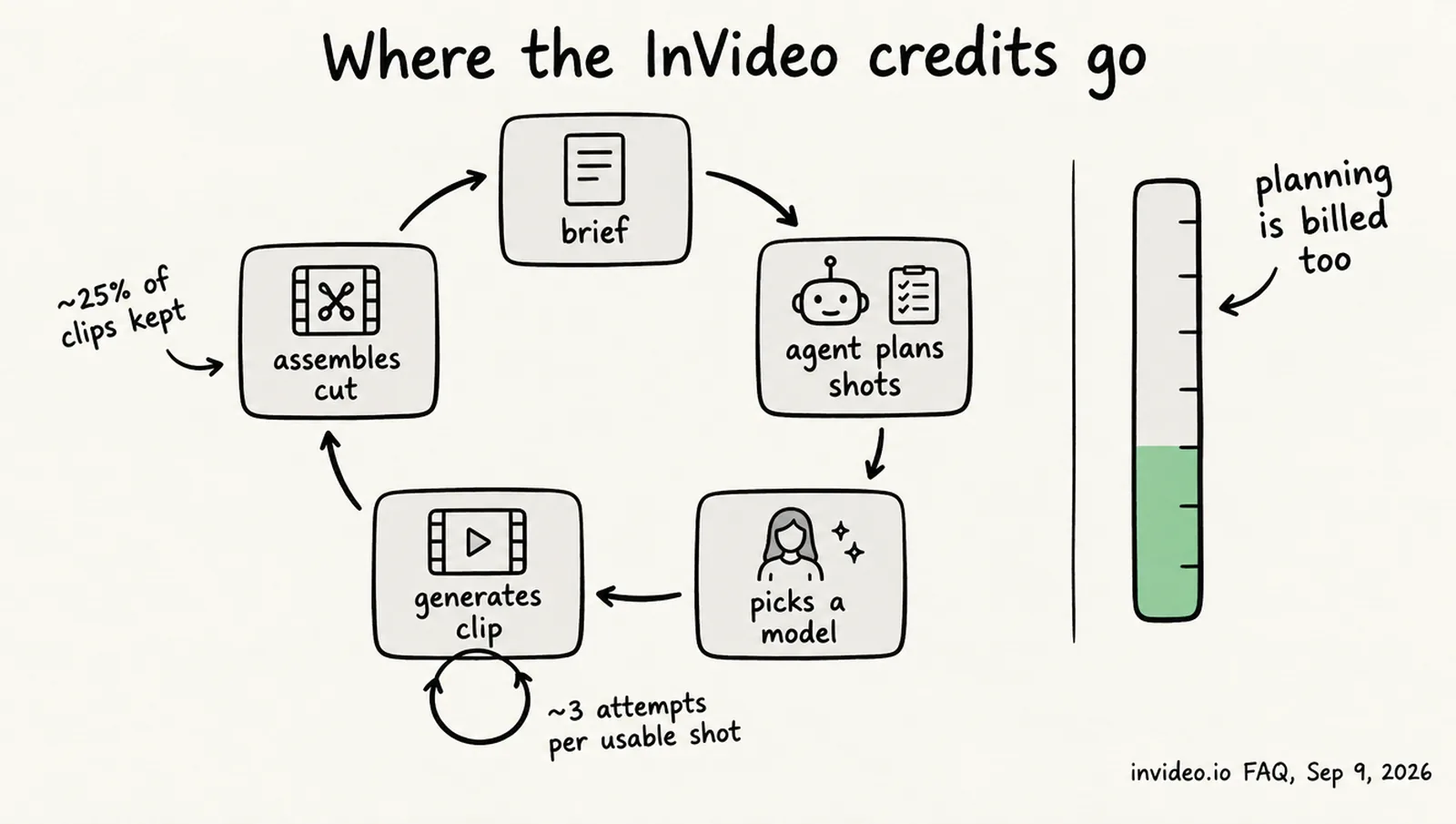
The candid part is InVideo’s FAQ on why the agent runs out of credits, updated September 9, 2026. It states that “usable shots average 3 attempts each,” that in one documented project “only 41 of 164 generated clips (~25%) made the final cut,” and that “every task bills, including the thinking”: in one episode “about 31% of the 26,162-credit total was spent before any pixel rendered.” It also admits that “the default permission mode generates without asking” and that “there’s no real-time credit counter in the interface,” and advises switching to always-ask mode, approving a storyboard first and finalizing images before generating video. Read those lines before you buy, because they describe the product more accurately than the homepage does.
Is the InVideo Editor really free?
Yes, as far as InVideo’s documentation goes: manual editing and exporting cost nothing, and only AI generation uses credits. The September 2026 release notes describe “frame-accurate multitrack editing,” keyframes with custom Bézier easing, a color grading suite with wheels, curves, LUTs and scopes, an audio mixing workspace with buses and effects, and version control that can “branch the edit, tag versions.” The help center confirms that “manual timeline editing in invideo Editor is free and does not consume credits” and that “exporting or downloading content does not consume credits.” Exports are H.264 MP4 with a loudness target, audio-only WAV, AAC or Opus, a PNG still, or an editable project for Premiere Pro, Final Cut Pro or DaVinci Resolve. The pricing page’s own line is that “the full timeline, multiplayer editing, colour, audio and 3D are on every plan, including Starter.” What InVideo does not state is the maximum export resolution per plan: the Ultra agent mode mentions 4K and Plus and Max list Seedance 2.0 at 4K, but no page sets a rule for exports, so we treat 4K as unconfirmed for Starter. One observation is ours rather than InVideo’s: the free editor only matters if your footage already exists; the agent is what you are paying for.
Which AI models does InVideo include, and what do they cost?
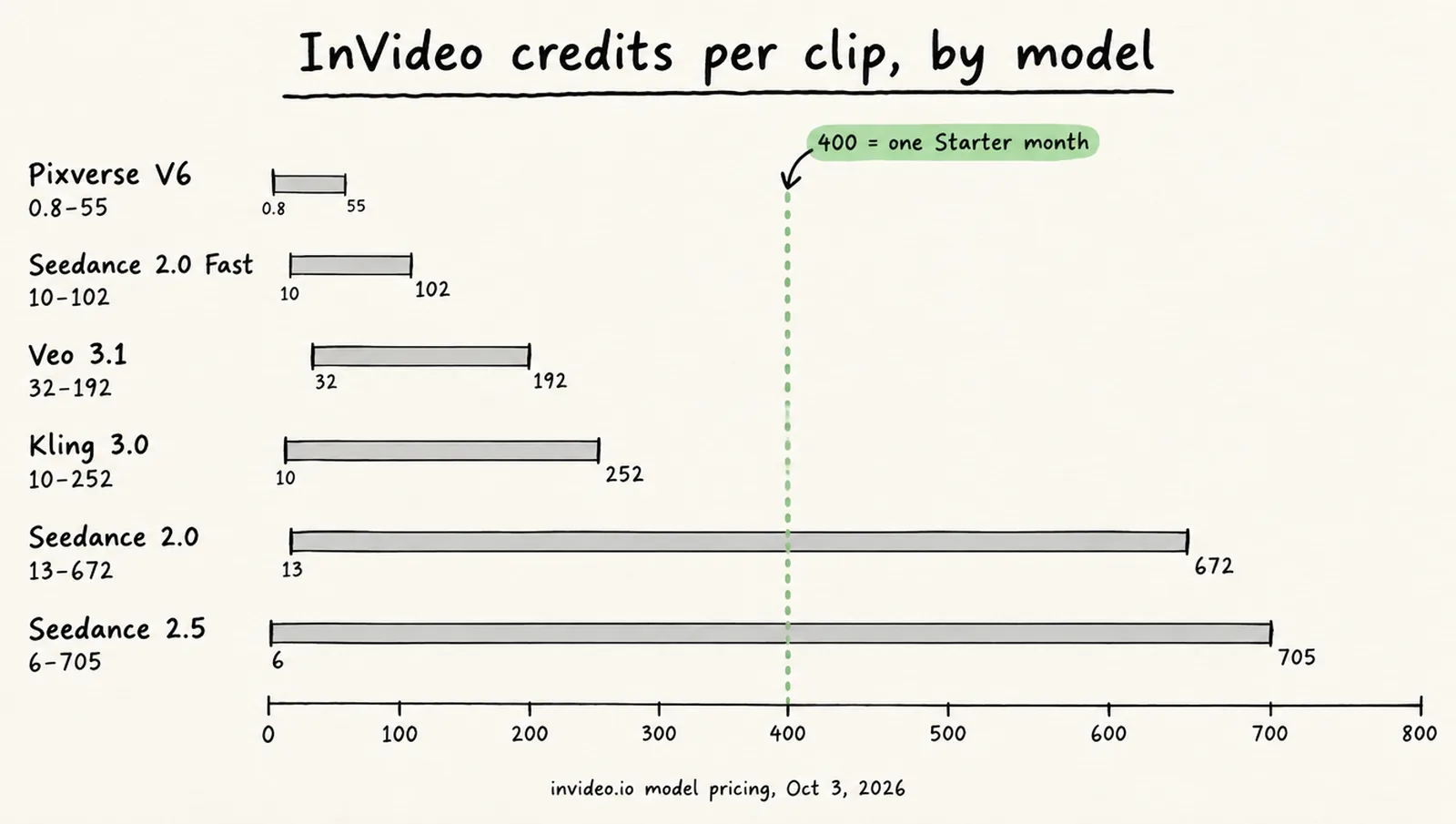
InVideo resells most of the current third-party video models and prices each one in credits per clip, with a range that depends on resolution and length. The model pricing page had roughly 70 rows on October 3, 2026, about 20 of them added since October 1, and the rates on the two biggest Seedance models had just been cut. Those figures are as served to a US reader on October 3; an older version of the page, still served to some readers, shows Seedance 2.5 topping out at 981 credits and Seedance 2.0 starting at 19.20. The table shows the cheapest and dearest configuration of the models most buyers ask about.
| Video model | Resolution | Length | Credits per clip |
|---|---|---|---|
| Seedance 2.5 | 480p to 1080p | 4 to 30 s | 6.10 to 705.00 |
| Seedance 2.0 | 480p to 4K | 4 to 15 s | 12.80 to 672.00 |
| Seedance 2.0 Fast | 480p to 720p | 4 to 15 s | 10.40 to 102.00 |
| Veo 3.1 | 720p to 4K | 4 to 8 s | 32.00 to 192.00 |
| Veo 3.1 Fast | 720p to 4K | 4 to 8 s | 12.80 to 96.00 |
| Kling 3.0 | 720p to 4K | 3 to 15 s | 10.08 to 252.00 |
| Runway Gen-4.5 | — | 5 to 10 s | 29.00 to 58.00 |
| Wan 3.0 | 480p to 1080p | up to 30 s | 4.80 to 288.00 |
| Pixverse V6 | 360p to 1080p | 1 to 15 s | 0.80 to 55.50 |
Beyond video, Pro-library avatars cost 20 credits a minute, lip-sync and avatar models are billed per second (HeyGen Photo Avatar 2.40 a second, Kling Avatar 2.20 to 4.50), and images run from 0.01 credits for Z-Image Turbo to 1.50 for GPT Image 2, billed per image even in four-up grids. Voices cover “over 50+ languages,” with full support for eleven and no subtitles yet for Arabic, Chinese, Thai, Hindi and several others. Stock comes from iStock, Shutterstock and Storyblocks, with premium stock footage capped at 100, 200 or 500 a month by plan, an allowance InVideo’s help pages describe in terms of iStock. Two inconsistencies are worth knowing. Sora is named in InVideo’s app-store copy (“Veo, Sora, Kling, Seedance, Nano Banana, and the rest of the frontier”) but does not appear in the price list. And the pricing page quotes Nano Banana Pro at “~2.5 credits/image” while the image-pricing page lists 0.25 to 0.40, a tenfold gap InVideo has not explained.
How much does InVideo AI cost in 2026?
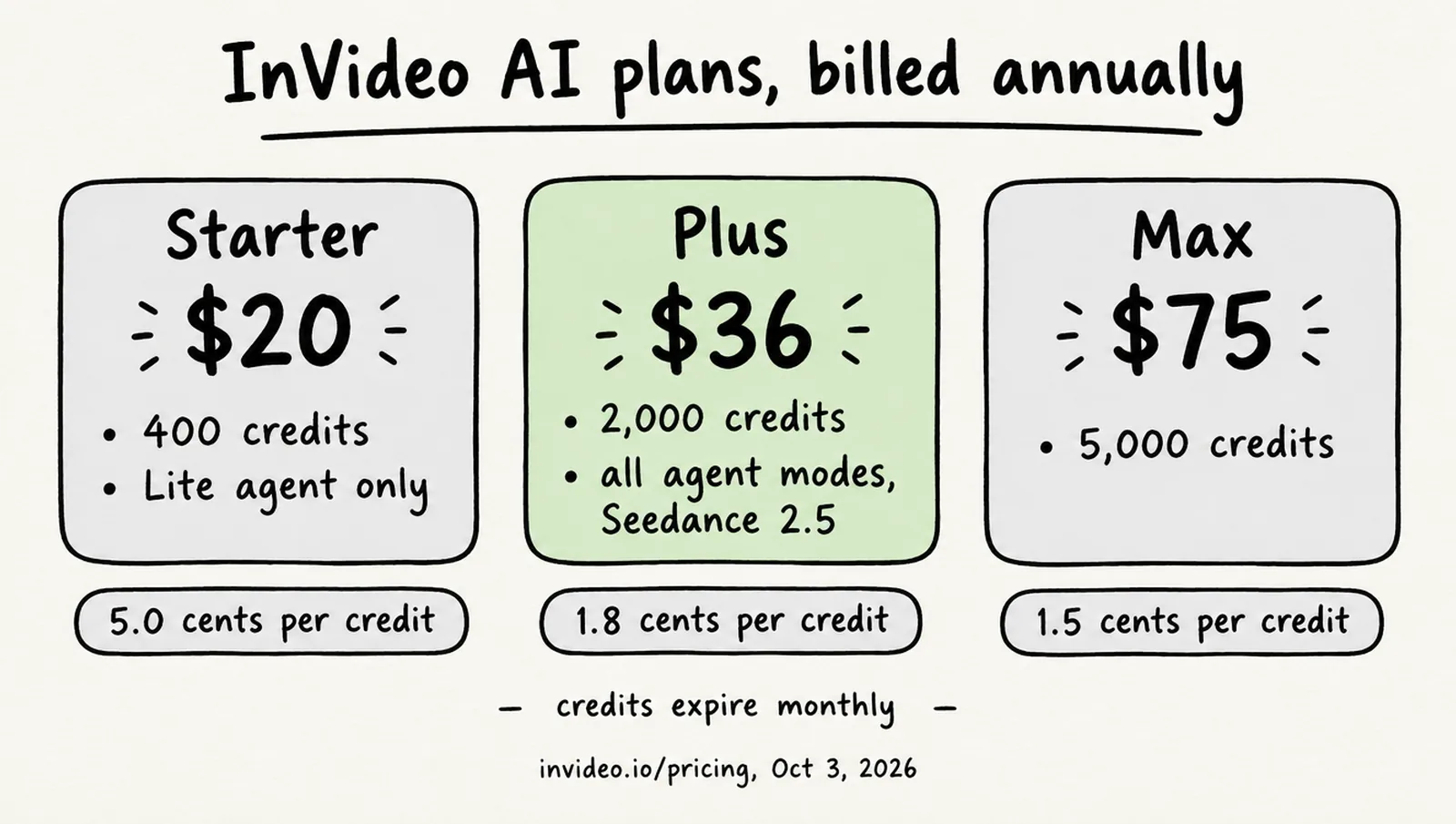
InVideo AI costs $20, $36 or $75 a seat a month on annual billing in the US, after a price cut that appeared on the pricing page between October 1 and October 3, 2026 with no announcement. On October 1 the same page showed Plus at $50 and Max at $101 on annual billing; two days later it showed $36 with a “40% off” label and $75 with “50% off,” each against a struck-through monthly price. Nothing on the page says whether the new figures are permanent, so treat them as current rather than settled.
| Plan | Monthly billing | Annual billing (per month) | Credits a month | Storage | Premium stock | Seats | Model access |
|---|---|---|---|---|---|---|---|
| Starter | $20 | $20 | 400 | 200 GB | 100 | Up to 5; no guests | Agent Two Lite; Seedance 2.0 Fast and Mini only |
| Plus | $60 | $36 | 2,000 | 600 GB | 200 | Up to 10, plus 10 guest seats | Lite, Pro and Ultra; Seedance 2.5 at 1080p, Seedance 2.0 at 4K; early access to advanced AI features |
| Max | Not shown (about $150 implied) | $75 | 5,000 (10,000 and 15,000 options) | 2,000 GB | 500 | Up to 20, plus 20 guest seats | Same as Plus; “lowest cost per credit” |
On annual billing a credit costs about 5.0 cents on Starter, 1.8 cents on Plus and 1.5 cents on Max, which is our arithmetic. Starter is the same price monthly or annually and cannot use Seedance 2.5, Seedance 2.0 above 720p or the Pro and Ultra agent modes, so Plus is the first plan with full model and agent access; the hands-on reviewers all tested the old Plus plan, which was then the entry tier. Max’s monthly price was not rendered on the page; the “50% off” label implies $150. InVideo also shows different plan names and lower prices to visitors in some countries, and its iOS app sells in-app plans (Starter Monthly $24, Plus $30, Generative $143.99) under names that do not match the web lineup, so confirm the price from your own location before you compare it with anything in a review.
Affiliate link — we may earn a commission at no extra cost to you.
See current InVideo AI plansWhy do InVideo credits run out so fast?
Because the meter runs on attempts, not results, and the product is built to make many attempts. InVideo’s FAQ puts it in numbers: budget one generation per shot and “your real spend lands roughly 3–4x higher”; in its examples a single Seedance 2.0 generation “ran 16 credits … in one session and 27 credits per pass in another”; documented short films “ran 3,000–20,000 credits ($750–$5,000), and full episodes 26,000–30,000 credits.” Rejected takes bill the same as approved ones. Unused credits “don’t roll over,” InVideo “reserves the right to update credit costs at any time, without prior notice,” and extra credits bought as a top-up last up to 12 months on InVideo’s Extra Credits page (its billing overview says they reset each cycle) and are non-refundable. The refund policy allows a refund within seven days only if no credits were used, which in practice means a refund is available only to people who never tried the product.
The hands-on reviews describe the same thing from the user’s side. Marc Andrews, testing in July 2026 with credit logs, found that “one Pro video consumed entire monthly allowance unfinished” and that the agent “goes silent at zero balance; upsell appears in failure state.” Nena Jasar at nenawow used 81.8 of a 75-credit allowance and ended with “zero finished Shorts I wanted to publish.” Both tested the old Plus plan, whose 75 credits were a different unit from today’s 2,000 (InVideo rescaled credits by about ten), so the counts do not transfer; the pattern does. Trustpilot adds the same complaint in the current unit: “I spent $80 and essentially got nothing in return. It burned through 2300 credits” (Invideo Studio profile, October 3, 2026).
Three settings InVideo itself recommends before you generate
Switch the agent from its default to always-ask mode so it pauses before each generation; approve a storyboard before any video is rendered; and finalize images before converting them to video. All three come from InVideo’s own FAQ, and all three exist because the default path spends credits without asking.
How good is the output, according to hands-on reviewers?
Fast and presentable for social content, generic by default, and hard to steer with precision. That is the consensus of the four hands-on reviews we found from 2026, which differ mainly on whether the trade is worth the price.
| Reviewer | Verdict | Liked | Did not like |
|---|---|---|---|
| TechRadar, Krishi Chowdhary (updated July 20, 2026) | “Recommended”; the agent is “one of the best AI models on the market” | Conversational editing; “rich collection of iStock assets” | “Quite expensive”; even its Max plan costs more than the top plans of Veed, Kapwing, Fliki or Filmora |
| Unite.AI, Janine Heinrichs (April 15, 2026) | “A fast, beginner-friendly AI tool that turns prompts into videos” | Full videos in minutes; voices in 50+ languages; dubbing and voice cloning | “Limited creative control”; “videos can look similar”; free plan “quickly runs out of credits” |
| Marc Andrews (tested July 2026, updated October 2026) | 3.9/5: “fast branded videos from prompts, but credits vanish quicker than the plans suggest” | “Output quality exceeds expectations”; no models padlocked, credits are the only gate | One video used the month’s allowance unfinished; “pricing opaque” |
| nenawow, Nena Jasar (August 5, 2026) | “I would not renew InVideo AI Plus based on this test” | “Polished, modern interface”; wide model range; some attractive clips | “Generated components rather than cohesive videos”; credits gone with nothing publishable |
Two more sources are worth reading with their bias in view. Zebracat, a competitor, scored InVideo 3.8/5 after an 80-word script test and called it “a capable prompt-to-video tool for stock-and-template social content” whose “credit system creates iteration costs that inflate effective per-video pricing.” SaaS CRM Review, a desk review from September 2026, judged it “a strong fit for teams shipping many related deliverables from one creative foundation, and a poor fit for anyone whose work is one-off or whose finance team needs a fixed monthly number.” That last sentence is the best one-line summary of the product we found.
What do users say about InVideo AI?
User ratings split by platform in a way that tells you what each platform measures. The software-review sites rate it well; the open review sites, where people go to complain about money, do not.
| Platform | Score | Count | Note |
|---|---|---|---|
| Trustpilot, invideo AI | 3.0 / 5 | 892 | 61% five-star, 29% one-star; claimed July 2024 |
| Trustpilot, Invideo Studio | 1.8 / 5 | 1,018 | 57% five-star, 32% one-star |
| G2 | 4.5 / 5 | 163 to 178, depending on page | Support 9.1/10, ease of setup 9.7/10 |
| Capterra UK | 4.5 / 5 | 416 | 92% positive, 6% negative |
| US App Store | 4.5 / 5 | 28,000 | Version 4.5.56, October 2, 2026 |
| Google Play | 3.9 / 5 | 139,000 | 10 million+ downloads |
The recurring themes, with dates, from the Trustpilot, Capterra and Google Play reviews we read:
- Credits drain with no counter. “They hide how many credits each video actually costs” (September 22, 2026). Google Play: “Credits are used up quickly, especially when scenes need corrections.”
- Paying again to fix the AI’s mistakes. “Their AI charges me credits to create a 6 legged dog, then I pay more to fix it” (September 11, 2026).
- Refunds refused once anything is generated.Capterra UK: a reviewer reported a refund denied after same-day testing because credits had been consumed (June 17, 2026); another reviewer described an unauthorized auto-reload of “over $100” (August 6, 2026).
- Retry loops that consume credits. “Went into retry loop … until eventually run out of credits” (September 29, 2026).
- Support is the most praised element. “Eva remained professional, understanding, and caring throughout” (September 21, 2026); another reviewer reported support “restored credits to our account.” G2’s support sub-score is 9.1.
- Legacy-plan loss. After the September lineup change: “I lost a valuable legacy subscription and the credits I had paid for” (early October 2026).
Of the eight most recent “invideo AI” Trustpilot reviews on October 3, five were one-star and at least three of those were about credits. No measured share exists; that is the sample.
Is the free plan enough to judge it?
It is enough to see the interface and the editor, and not enough to learn what a finished video will cost you. InVideo says you can use the product “for free without entering your card details,” that the free plan “gives you limited credits to explore the platform,” and that the quota “is reset weekly on Monday at 12 a.m. UTC.” It does not publish the credit number, an export cap, a resolution or a watermark rule, and the free plan is not on the pricing page. One help article notes that a video made on a paid plan “will require a paid plan to download without a watermark” once the account lapses. In July 2026 Marc Andrews used “4.8 of 5 credits” to make one 60-second stock-based video on the free plan, before the credit rescale. Expect one short test a week and treat it as a tour.
Who is InVideo AI for, and who should skip it?
- Good fit: marketing teams and agencies producing many variations of short ads or social clips from one brief, where the agent’s project memory and multi-shot edits save real hours and a Max plan’s 5,000 credits are a line item. This is the audience InVideo names (“filmmakers, marketing teams, Meta ads teams, and agencies”) and the one SaaS CRM Review points to.
- Good fit with discipline: faceless YouTube or explainer channels built on stock plus voiceover, on Plus, with always-ask mode on. Unite.AI and Zebracat both describe this use as the one the tool does well.
- Poor fit: anyone who needs one polished video for a fixed price, expects cinematic AI footage on the first try, or wants an editor first and generation second. For editing, the free InVideo Editor or CapCut will cost you nothing; see our CapCut Pro pricing guide.
- Poor fit: Starter buyers. 400 credits with the Lite agent and the two smallest Seedance models is a demonstration, not a production budget, and the plan is priced the same whether you commit for a month or a year.
Verdict: is InVideo AI worth it?
InVideo AI is a capable, fast and honestly documented product that is expensive in a way its plan cards do not show. The agent does what InVideo says: it plans, generates and edits across a whole timeline, with a free professional editor underneath and a model list that now covers almost everything but Sora. The price of that convenience is set by retries, and InVideo’s own numbers (three attempts per usable shot, a quarter of clips kept, a third of credits spent before rendering) match what every hands-on reviewer and many one-star reviewers describe. If your work is volume, it is worth it on Plus at $36 a month billed annually, with always-ask mode on and a storyboard approved before anything renders. If your work is one video at a time with a budget you have to name in advance, it is not, and the refund policy will not rescue a wrong guess. For a side-by-side with a flat-fee editor, read InVideo vs CapCut.
Frequently asked questions
Is InVideo AI legit?
Yes. InVideo is sold by Invideo Inc., its iOS app has 28,000 ratings at 4.5 stars, and it announced SOC 2 Type II compliance in August 2026. The complaints are not about fraud but about cost: Trustpilot reviewers describe credits running out without a finished video and refunds refused once any credit has been used, which matches InVideo’s own published terms.
How many credits does one InVideo video use?
InVideo does not publish a per-video figure, and its own FAQ explains why: usable shots average three attempts each, and only about 25% of generated clips make a final cut. In its examples a Seedance 2.0 generation cost 16 to 27 credits, and documented short films ran 3,000 to 20,000 credits. A Seedance 2.0 Fast clip is listed from 10.4 credits at 480p and four seconds, InVideo’s pricing page budgets about 30 credits for a five-second 720p clip, and a Veo 3.1 clip starts at 32.
Is InVideo AI worth it for YouTube creators?
For high-volume, stock-and-template or AI-footage channels, the hands-on reviews say yes with caveats: drafts arrive in minutes, voices cover 50+ languages, and the manual editor is free. For a channel that needs one polished video a week, the same reviews found the credit cost of retries hard to predict. Plus at $36 a month billed annually is the first plan with full model and agent access.
Does InVideo AI have a free plan?
Yes, and it needs no card. InVideo says the free plan gives “limited credits to explore the platform,” resets every Monday at midnight UTC, and allows image generation and sharing to social media. It publishes no credit number, export resolution or watermark rule for the free tier, and the plan does not appear on the pricing page.
Is InVideo AI better than CapCut?
They do different jobs. InVideo generates footage from a prompt and bills per generation; CapCut is a flat-fee editor with AI features and credits on top. CapCut Pro costs $19.99 a month or $179.99 a year, while InVideo’s Plus plan is $60 a month or $36 billed annually. Our InVideo vs CapCut comparison sets the two side by side.
Can you get a refund from InVideo?
Only within seven days of a purchase or renewal, and only if no credits or premium features were used in that time. There are no pro-rata refunds, and extra credits are non-refundable. Purchases made through the iOS app are refunded by Apple under Apple’s rules.
Sources
Prices and plan details were checked against these pages on . Vendors change pricing often, so confirm on the official page before you buy.
- InVideo — homepage (positioning and Agent Two claims)
- InVideo — pricing page
- InVideo help — video model pricing in credits
- InVideo help — image model pricing in credits
- InVideo FAQ — why does the invideo agent run out of credits (updated September 9, 2026)
- InVideo help — how credits are charged when using AI agents
- InVideo help — plans and credits
- InVideo help — can I use invideo AI for free
- InVideo help — editing a paid-plan video after moving to the free plan
- InVideo help — exporting video, audio or a PNG still from invideo Editor
- InVideo help — generating videos in other languages
- InVideo help — actors from the invideo library
- InVideo — introducing invideo Editor (September 1, 2026)
- InVideo — introducing agentic sound design (September 25, 2026)
- InVideo — introducing agentic effects (September 30, 2026)
- InVideo — introducing invideo MCP (September 30, 2026)
- InVideo — terms and conditions
- InVideo help — refund policy
- InVideo help — Extra Credits
- Apple App Store — invideo AI
- Google Play — invideo AI
- TechRadar — InVideo review (updated July 20, 2026)
- Unite.AI — InVideo review (April 15, 2026)
- Marc Andrews — InVideo AI review 2026 (hands-on, credit logs)
- nenawow — InVideo AI review (August 5, 2026)
- Zebracat — InVideo review (competitor, June 10, 2026)
- SaaS CRM Review — InVideo agent review (desk review, September 24, 2026)
- Trustpilot — invideo AI
- Trustpilot — Invideo Studio
- G2 — InVideo (comparison page showing the rating)
- Capterra UK — InVideo reviews