AI Video · Comparison · Updated
InVideo vs Pictory (2026): Generated Footage or Stock-Based Video, and Which Costs Less
By KGen Research · Published · 14 min read · Some links are affiliate links; we may earn a commission at no extra cost to you. Disclosure
Short answer
Choose Pictory if you already have the words or the footage: it turns scripts, blog posts and recordings into stock-based videos and edits recordings by transcript, from $25 a month billed annually. Choose InVideo if you want new footage: its agent generates clips with about 70 AI models, from $20 a month, with a free editor and a 7-day refund window if unused.
How we researched this
This is a research guide, not a hands-on test. Prices, limits and rules come from InVideo’s and Pictory’s pricing pages, help centers and terms, read on October 5, 2026; InVideo’s US prices were read through a US connection because InVideo shows other countries a different price list. Cost-per-clip and cost-per-minute figures are our arithmetic on the vendors’ published rates and are labeled. We earn a commission if you buy InVideo through our link. We earn nothing from Pictory.
InVideo vs Pictory at a glance
| InVideo | Pictory | |
|---|---|---|
| What it is | An AI agent that plans and generates footage with third-party models, plus a free multitrack editor | Script, blog, document and recording to video, assembled from stock footage, with edit-by-transcript |
| Entry plan | Starter, $20 a month (400 credits) | Starter, $29 a month or $25 billed annually (200 export minutes, 100 AI credits on the plan card) |
| Main plan | Plus, $60 a month or $36 billed annually (2,000 credits) | Professional, $59 a month or $35 billed annually (600 export minutes, 500 AI credits) |
| What the plan meters | Credits only; downloads and manual editing are free | Export minutes, plus separate AI credits and ElevenLabs voice minutes |
| Free option | Permanent free plan, no card, weekly allowance (size not published) | 14-day trial: 3 projects, 720p, watermark; no free plan after |
| AI video models | About 70, including Seedance 2.5, Veo 3.1, Kling 3.0, Runway Gen-4.5 | Pixverse 5.5, Veo 3.1 Fast, Veo 3.1, Omni Flash |
| Maximum export | 4K export on Max per its plan data; Plus can generate some 4K clips but lists Full HD export | 1080p on paid plans; MP4 only |
| Credit rollover | No | AI credits roll over while subscribed (on eligible plans); export minutes reset monthly |
| Refunds | Within 7 days if nothing was generated or downloaded; case by case | None on paid subscriptions |
| Mobile app | Official iOS and Android apps | None; look-alike apps exist |
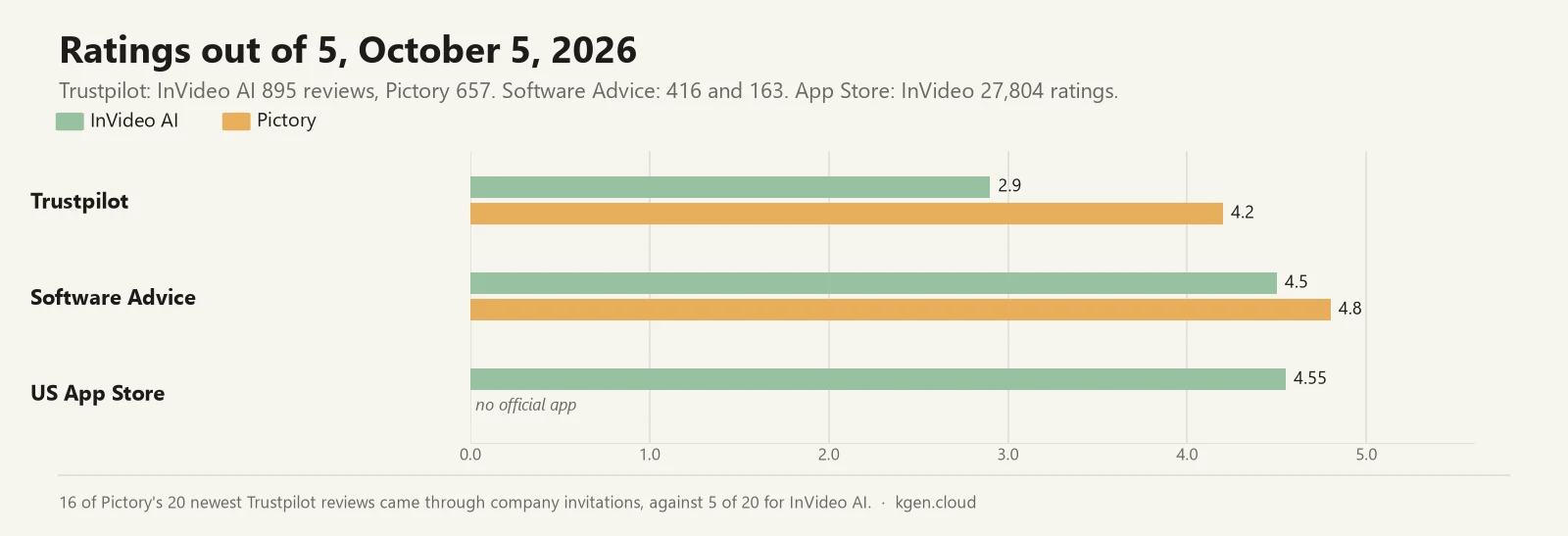
| Trustpilot | 2.9 / 5 from 895 reviews | 4.2 / 5 from 657 reviews (16 of the 20 newest invited) |
What is the difference between InVideo and Pictory?
InVideo creates footage; Pictory assembles it. InVideo’s agent takes a brief, plans the shots, picks a generation model for each and runs it, then hands you a cut on a multitrack timeline that InVideo says is free to use. Pictory starts from material you already have, a script, a blog URL, a slide deck or a recording, breaks it into scenes and matches each scene to stock footage from Storyblocks and, on higher plans, Getty Images, with an AI voice reading the text. Pictory added AI image generation in October 2025 and video generation in January 2026, and InVideo added a manual editor in September 2026, so the two now overlap more than most comparisons say. The starting point still decides the fit. InVideo describes its agent as one that “picks the model, writes the prompt, and runs the shot”; Pictory describes a system that builds “a scene based narrative with visuals chosen through AI search or AI Studio generation.”
How do InVideo and Pictory prices compare?
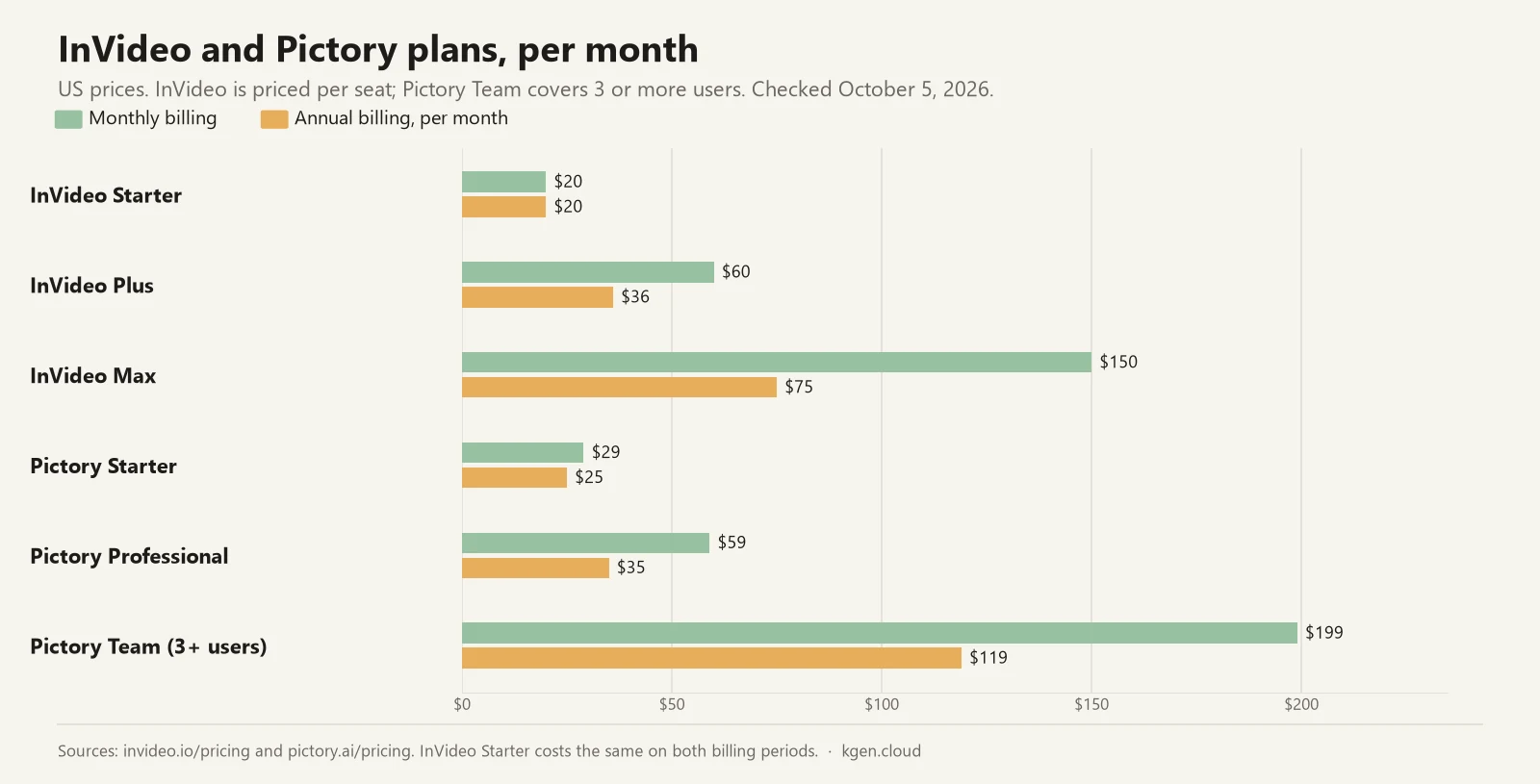
The two price lists look alike at the bottom and differ in what they sell. Pictory quotes its prices in US dollars. InVideo prices per seat and shows different plans to visitors in some countries, so the figures below are what a US visitor sees; our InVideo AI pricing guide covers the regional lists.
| InVideo plan | Monthly billing | Annual billing (per month) | Credits a month | Model access |
|---|---|---|---|---|
| Free | $0 | $0 | Limited, reset weekly | Limited; numbers not published |
| Starter | $20 | $20 | 400 | Agent Two Lite; Seedance 2.0 Fast and Mini |
| Plus | $60 | $36 | 2,000 | All agent modes; Seedance 2.5 at 1080p, Seedance 2.0 at 4K |
| Max | $150 | $75 | 5,000 | Same as Plus; lowest cost per credit |
| Pictory plan | Monthly billing | Annual billing (per month) | Export minutes a month | AI credits a month | ElevenLabs minutes |
|---|---|---|---|---|---|
| Free trial (14 days) | $0 | — | 15 in total | 50 in total | 5 |
| Starter | $29 | $25 | 200 | 100 on the plan card (200 in one table) | 60 on the plan card |
| Professional | $59 | $35 | 600 | 500 (1,000 under an annual offer) | 120 |
| Team (3+ users) | $199 | $119 | 1,800, shared | 2,400 | 240 |
Three details change the arithmetic. Pictory’s annual toggle says “save up to 40%,” but Starter saves only about 14% ($29 to $25), against about 40% on Professional and Team, by our arithmetic. Pictory’s site currently runs a “Pictory 2.0 offer” that doubles Professional’s AI credits to 1,000 a month on annual billing, with no end date shown, and its own pricing page lists Starter’s credits as 100 on the plan card and 200 in one comparison table. On InVideo, the annual prices for Plus and Max are labeled “40% off” and “50% off,” and Starter costs the same whichever way you pay.
Affiliate link — we may earn a commission at no extra cost to you.
See InVideo AI plansWhat do you actually pay for: credits or export minutes?
Pictory’s main meter charges for exported video; InVideo’s charges for every attempt at it. Pictory’s main allowance is export minutes: 200, 600 or 1,800 a month, counted only on the first download of each project, and reset on the first of the month without rollover. AI generation draws on a separate balance of AI credits, which do roll over while you stay subscribed, and premium ElevenLabs voices on a third. InVideo has a single meter: credits, spent on each generation and on the agent’s planning, and not spent on manual editing or downloads. Its credits reset at the start of each billing cycle without rollover, and InVideo’s own FAQ warns that “usable shots average 3 attempts each.”
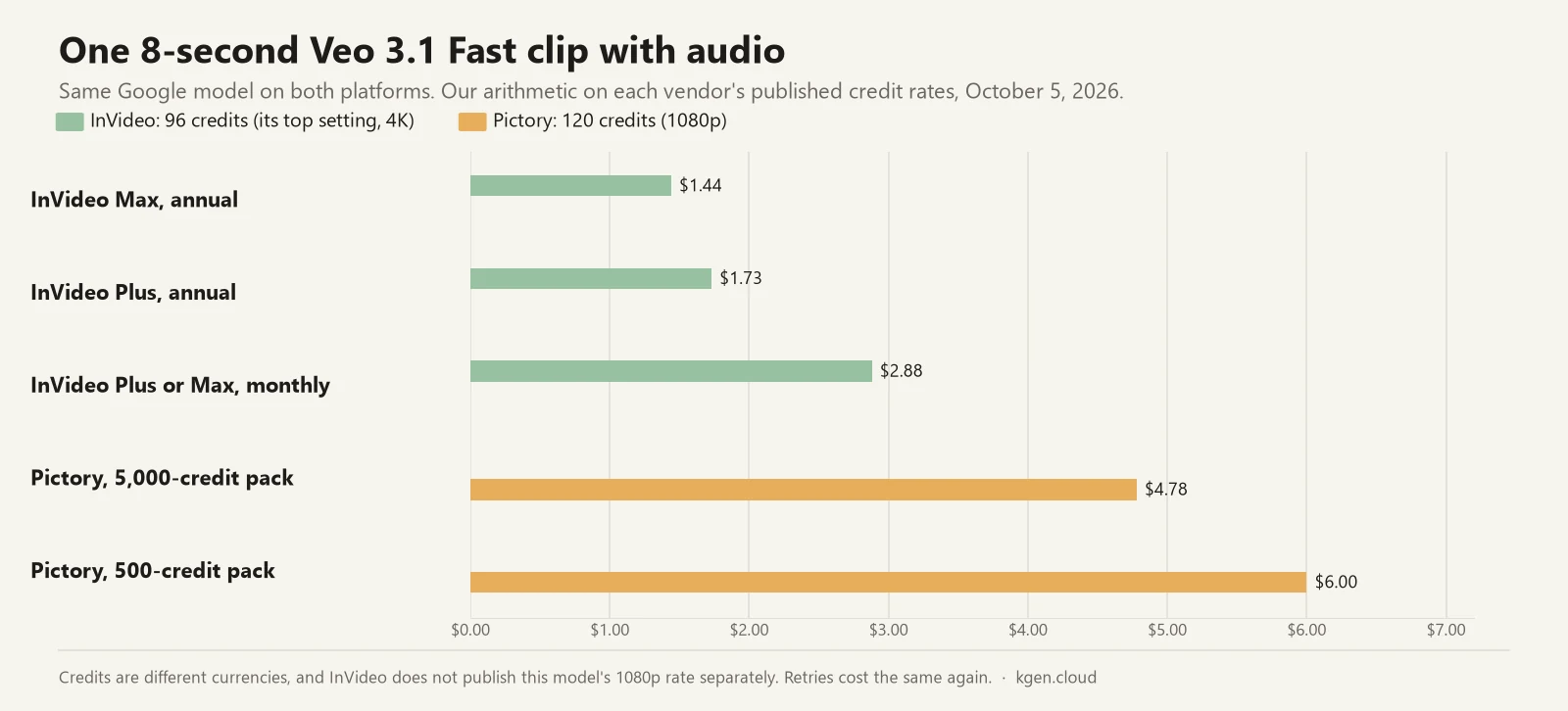
Measured per finished minute, by our arithmetic, a stock-based Pictory video costs between about 6 and 15 cents if you use the whole monthly allowance (Professional annual at $420 a year for 7,200 minutes is the low end, Starter monthly the high end), and more if you use less of it. InVideo does not publish what a stock-only video costs under its current credit scale, so the fair comparison is generated footage. A minute of Seedance 2.0 Fast at 720p, at the roughly 30 credits per five seconds InVideo’s pricing table quotes, costs $5.40 on Max annual and $6.48 on Plus annual for a single take; triple it for InVideo’s own retry estimate. For the two Veo models both platforms sell, InVideo’s published rate is lower: one eight-second Veo 3.1 Fast clip with audio costs $1.44 to $2.88 on InVideo at its top 4K setting and $4.78 to $6.00 on Pictory at 1080p, by our arithmetic. For their other shared models the rates cannot be compared from public figures.
Which has the better free plan or trial?
InVideo’s, because it does not end, though InVideo publishes less about it. InVideo says you can use it “for free without entering your card details,” with a quota that “is reset weekly on Monday at 12 a.m. UTC”; it does not publish the number, an export resolution or a watermark rule for free accounts, and a help article says lapsed accounts need “a paid plan to download without a watermark.” A free account keeps the full manual editor. Pictory has no free plan, only a 14-day trial with three projects, 15 export minutes, 50 AI credits and 720p export, and since March 2026 trial videos carry a Pictory watermark. When the trial ends, Pictory says, “you will not be able to download videos unless you have a paid subscription.” Whether Pictory’s trial asks for a card could not be confirmed from its pages. The trial is enough to judge Pictory’s stock matching on your own topic, which is the thing most worth testing.
Which is better for turning scripts, blogs and recordings into video?
Pictory, by design. Its create menu covers idea, script, URL, document, PDF, PowerPoint and audio to video, and scripts can run to 30 minutes on paid plans. Its AI Video Editor treats a recording as text: you delete sentences from the transcript to cut the video, remove filler words and silences automatically, and generate short highlight clips from long recordings, with uploads of up to 60 minutes on Starter and 180 minutes on Professional and Team. Pictory licenses music from Melodie and, since September 1, 2026, asks you to add a music clearance code to YouTube descriptions before publishing. InVideo’s equivalent is an agent that can “review your footage and assemble a first cut,” paid in credits, followed by free manual editing on its timeline. The weak point on Pictory’s side is the stock match itself: one-star reviewers in 2026 describe footage that is generic or wrong for niche topics, so test it on your subject before paying for a year.
Which is better for AI-generated footage?
InVideo, on range, control and price per clip. Its model price list has about 70 rows, from Seedance 2.5 and Veo 3.1 to Kling 3.0, Runway Gen-4.5 and Pixverse, and its agent picks the model per shot. Plus and Max unlock Seedance 2.5 at 1080p and Seedance 2.0 at 4K; Starter is limited to Seedance 2.0 Fast and Mini. Pictory’s AI Studio offers four video models, Pixverse 5.5, Veo 3.1 Fast, Veo 3.1 and Omni Flash, at 10 to 40 credits a second for Veo, so a monthly Starter plan’s 100 credits (200 in one of Pictory’s own tables) buy about 10 to 20 seconds of Veo 3.1 Fast footage without audio, by our arithmetic. Two cautions apply to InVideo. Its pricing table raised the quoted cost of 1080p Seedance clips to about 72 credits per five seconds in early October 2026 without an announcement. And several comparison pages written by competing vendors still credit InVideo with Sora 2, as does InVideo’s own app-store copy and site footer, but InVideo’s own blog says the Sora API was scheduled to shut down on September 24, 2026, and Sora has no row in its price list.
How do voices, avatars and languages compare?
Pictory meters premium voices and both meter avatars. Pictory’s premium voices come from ElevenLabs “in 29 languages,” with 60, 120 or 240 minutes a month by plan and add-on hours beyond that. It added 22 stock AI avatars in January 2026 and custom avatars and voice cloning in May 2026, two of each on Professional, and a video translation feature in July 2026 that rewrites the script, captions and on-screen text into another language while keeping the visuals. One line in Pictory’s pricing FAQ still says text-to-video supports only English, which its newer features contradict. InVideo supports “over 50+ languages” and voice cloning, and its help center prices Pro-library avatars at 200 credits a minute, which is $3.00 to $6.00 a minute depending on plan by our arithmetic. Pictory charges 30 credits a minute for stock avatars and 70 for custom ones, about $1.19 to $1.50 and $2.79 to $3.50 a minute at its credit-pack prices.
How much editing control and export quality do you get?
Much more on InVideo. Its editor offers frame-accurate multitrack editing, keyframes, a color grading suite, an audio mixer and version control, and it exports editable projects to Adobe Premiere Pro, Final Cut Pro and DaVinci Resolve as well as MP4. InVideo’s pricing page data lists 4K export for Max and Full HD for Starter and Plus, although the Plus card offers Seedance 2.0 at 4K and the Ultra agent mode generates 4K clips. Pictory edits scene by scene in a storyboard, renders “all Pictory videos … in MP4 format,” and tops out at 1080p on every paid plan, 720p on the trial. Pictory includes 1, 5 or 10 brand kits by plan and shared projects on the Team plan, and it sells a self-serve API from $79 a month for automating video at volume; InVideo publishes no API prices. Both offer an MCP server for AI assistants, Pictory since July 2025 and InVideo since September 2026.
What happens if you cancel or want a refund?
InVideo has a narrow refund window that closes once you use anything; Pictory has none. InVideo’s terms allow a refund request “within seven (7) days of an initial purchase or renewal … provided you have not used any credits or premium features,” with no pro-rata refunds, and its help center says requests are reviewed “on a case-by-case basis.” Pictory’s pricing FAQ says: “We currently don’t offer refunds on paid subscriptions. However, you can cancel anytime and won’t be charged on renewal after cancellation.” Cancelling Pictory has a second cost: its pricing FAQ says projects are “permanently deleted from the platform upon cancellation,” and the alternative it offers is a pause at $1 a month that keeps your account and projects; on a monthly plan the pause lasts 90 days, then the subscription restarts on the same plan unless you cancel or change it first. Pictory’s terms also describe cancelling by email with 30 days’ notice, while its help center describes a self-serve cancel button; use the button and keep the confirmation.
Before you commit to a year of either
Pictory’s annual plans are its cheapest per minute and are not refundable; InVideo’s annual plans are refundable only within 7 days and only if nothing was used, and its annual discounts are shown as “40% off” and “50% off” with no stated renewal price. Run the free options first: InVideo’s free plan and Pictory’s 14-day trial cost nothing and are enough to see whether the output fits your topic.
Is there an InVideo app or a Pictory app?
InVideo has official apps; Pictory does not. InVideo’s iOS app, recently renamed “invideo: AI Video Editor,” rates 4.55 from 27,804 ratings, and its Android app rates 3.9 from about 139,000 reviews with 10 million+ downloads. Pictory’s help center says: “Pictory does not have an official iOS or Android app. Pictory is web-based and works in your mobile browser … Any app in any app store using the Pictory name is not affiliated with us,” and at least three apps using the Pictory name from unrelated sellers are live on the US App Store. If a search for a Pictory app brought you here, use Pictory in a browser: its mobile-browser chat flow takes you from idea to preview, and full editing and the final download happen on desktop, where it recommends Chrome.
What do users say about InVideo and Pictory?
Pictory rates higher everywhere, and the gap needs one caveat. Pictory scores 4.2 on Trustpilot from 657 reviews and 4.8 on Software Advice from 163; InVideo AI scores 2.9 on Trustpilot from 895 and 4.5 on Software Advice from 416. But 16 of Pictory’s 20 newest Trustpilot reviews arrived through company invitation links, against 5 of 20 for InVideo AI, so Pictory’s recent reviews lean toward customers it chose to ask, several of them thanking staff by name after onboarding webinars.
The themes differ in a way that matches the products. Pictory’s praise is about speed and support: “The script-to-video workflow is very efficient” (September 28, 2026) and “What really stands out, though, is the customer support” (October 1, 2026). Its complaints are about reliability and slow support: “11 out of 19 video projects never rendered” (September 28, 2026) and “Pickford chat bot is great but too long to wait for real support to reply” (September 30, 2026). InVideo’s complaints are about credits: “They hide how many credits each video actually costs” (September 22, 2026). The one reviewer we found who tried both, Marc Andrews in May 2026 (updated August 2026), put the split this way: “If you already publish written work and want it repurposed, Pictory does the job it advertises … If you have an idea rather than an article, InVideo’s agent is the better shaped tool,” but only “on one condition of its own: steer it to assemble stock rather than generate footage.” He also reports that a paid InVideo run “took twenty dollars of my money … and then stopped dead without ever assembling the video.” His InVideo test used a plan InVideo has since retired. For more on InVideo, see our InVideo AI review.
Verdict: should you choose InVideo or Pictory?
- Choose Pictory if your videos start as scripts, blog posts, slides or recordings, if you publish narrated stock-based videos at volume, or if you cut webinars into clips. Professional on annual billing, at $35 a month for 600 export minutes, is the cheapest per minute of anything here, provided the stock matches your topic and you accept that there are no refunds.
- Choose InVideo if you need footage that does not exist yet, a real editing timeline, 4K, export to Premiere or Resolve, a mobile app, or a refund window you can use if you have not generated anything yet. Plus at $36 a month billed annually is the first plan with every agent mode; budget for retries.
- Choose neither yet if you need one polished brand video: both tools produce drafts that reviewers describe as generic without editing.
- Try both first. InVideo’s free plan and Pictory’s trial cost nothing. For other pairings, see InVideo vs CapCut or every comparison on our comparisons page.
Frequently asked questions
Is Pictory better than InVideo?
For turning text or recordings you already have into stock-based videos, yes: Pictory is built for that, edits recordings by editing the transcript, and its paid plans are cheap per exported minute. For new AI-generated footage, a real editing timeline or 4K export, InVideo is the stronger tool. They solve different problems, and many buyers need only one of them.
Which is cheaper, InVideo or Pictory?
At the entry level InVideo is cheaper: Starter is $20 a month, against $29 for Pictory Starter, or $25 billed annually. At the middle tier they are level on annual billing: Pictory Professional is $35 a month and InVideo Plus $36. The bigger difference is the meter: Pictory charges by exported minutes plus separate AI credits, InVideo by credits only. For the same Veo 3.1 Fast clip, InVideo's published rate works out cheaper.
Does Pictory have a free plan?
No. Pictory offers a 14-day free trial with 3 video projects, 15 export minutes, 50 AI credits, 720p export and a Pictory watermark, and after it ends you cannot download videos without a paid plan. InVideo has a permanent free plan that needs no card, with a weekly credit allowance whose size it does not publish, and it publishes no export resolution or watermark rule for free accounts.
Can Pictory generate AI video like InVideo?
Yes, since January 2026. Pictory's AI Studio generates clips with Pixverse 5.5, Veo 3.1 Fast and Veo 3.1, paid in AI credits; Veo costs 10 to 40 credits a second. Its core is still stock footage matched to your script. InVideo is built around generation: its agent picks among about 70 models, including Seedance, Veo, Kling and Runway, and plans the shots.
Is there a Pictory app?
No. Pictory says it has no official iOS or Android app and that any store app using its name is not affiliated with it; several look-alike apps are live on the US App Store. Pictory works in a desktop browser, preferably Chrome, with a chat-based flow for previews on mobile browsers. InVideo has official iOS and Android apps.
Which is better for a faceless YouTube channel?
If the channel runs on scripts or blog posts narrated over stock footage, Pictory fits: script to video up to 30 minutes, ElevenLabs voices and YouTube music clearance codes. If the channel's visuals must be original generated footage, InVideo fits, but budget for retries: InVideo's own FAQ says usable shots average three attempts each.
Sources
Prices and plan details were checked against these pages on . Vendors change pricing often, so confirm on the official page before you buy.
- InVideo — pricing page (US)
- InVideo help — video model pricing in credits
- InVideo help — how credits work
- InVideo help — can I use invideo AI for free
- InVideo help — how credits are charged when using AI agents
- InVideo help — is invideo Editor free, and which actions use credits
- InVideo help — create a first cut from raw footage
- InVideo help — exporting video, audio or a still from invideo Editor
- InVideo help — actors from the invideo library (avatar credits)
- InVideo help — refund policy
- InVideo — terms and conditions (updated July 8, 2026)
- InVideo FAQ — why the agent runs out of credits
- InVideo blog — Sora AI video generator (Sora API shutdown)
- Apple App Store — invideo: AI Video Editor
- Google Play — invideo AI (agent description, ratings)
- InVideo — introducing invideo MCP (editor features, September 30, 2026)
- InVideo help — generating videos in other languages
- Pictory — pricing page
- Pictory help — understanding AI credits (rates, rollover, packs)
- Pictory help — release notes
- Pictory help — the new video-minute pricing structure
- Pictory help — removing the trial watermark
- Pictory help — why Getty Images is not on the Starter plan
- Pictory help — AI Video Editor collection (edit by transcript)
- Pictory help — AI Studio overview
- Pictory help — video translation
- Pictory help — are videos created on Pictory copyright-free (music clearance)
- Pictory help — does Pictory have a mobile app
- Pictory help — how to cancel a subscription
- Pictory help — how to pause a subscription
- Pictory help — general FAQ (MP4 output, browser)
- Pictory — API pricing
- Pictory — terms of service
- Pictory help — FAQ on pricing and plans (downloads after the trial)
- Pictory help — create a video on mobile
- Trustpilot — invideo AI
- Trustpilot — Pictory
- Software Advice — invideo vs Pictory
- Marc Andrews — InVideo vs Pictory 2026 (hands-on, May 6, 2026; updated August 28, 2026)
- Marc Andrews — Pictory review 2026 (hands-on, April 27, 2026)
- Wyzowl — Pictory review (video agency)